
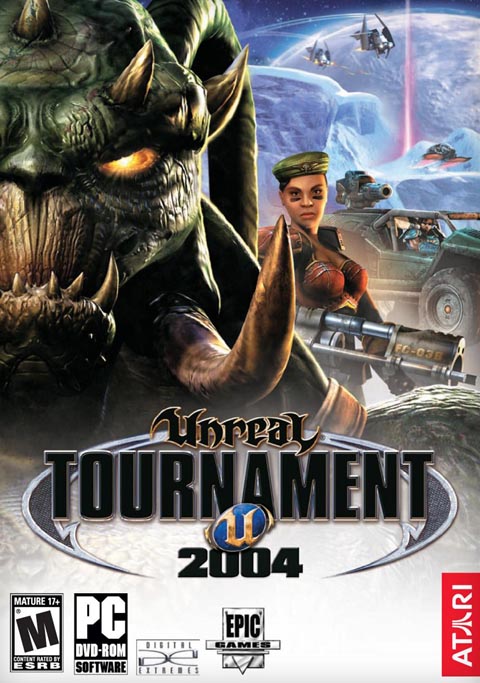
Reload. Rev up. Ride out. The ultimate sport of kill-or-be-killed is now an explosive new experience, with mind-blowing new ways to move like lightning and annihilate enemies.
For the first time, pilot a formidable force of battle vehicles that tear across land, skies and deep space. Load up pulverizing new weapons. Storm across 40 never-before-seen arena maps. Move faster, fly higher, shoot further.
Related Articles
Over 10 years ago, Unreal Tournament 2004 was blessed with the Clone Bandits Mod, and it was fantastic, so much fun with all the custom maps, vehicles and the theft of the other teams clones. Props to the mod designers when working on this mod!
In 2022, replaying this mod is super fun to the point where I would love to get involved and make some edits and updates to the mod, to get some additions into the mod to make the playability at the highest is can be. Not to say it already is of course!
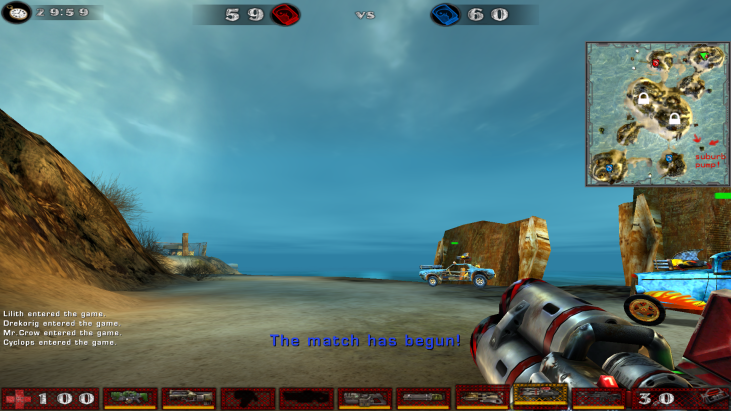
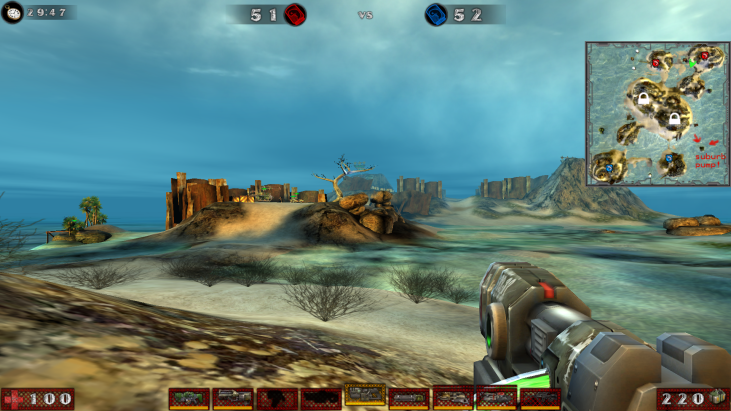
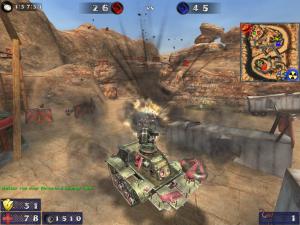
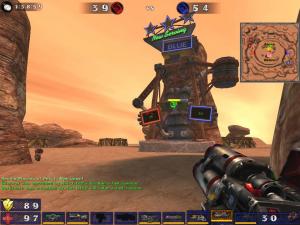
First off, a little graphical update of the HUD, with the implementation of Azaraels HUDFix mutator as shown in the screenshots below. The current mod has no support for widescreen, along with all other game modes in UT2004, but with a simple code change, the HUD will work with widescreen support up to 8K, unlike the standard 1024x768. Below is the current HUD verses the widescreen fix HUD. Allowing for this change will stop stretching of the HUD and will scale the HUD down for larger screens, for better gameplay.
Second off, there are many community maps out lost in archived downloads, I will hopefully be combining all the bonus packs together to ensure all content is in one place. So far i have gained over 10 custom maps not included within the original pack and within the community bonus content on ModDB.
Next off, I shall be finishing and polishing and BETA content left by the developers to ensure the mod is finished and polished. Some maps were left unfinished either by the original developers or by community content creators, so completing this content for everyone to play will be very helpful as new content
Another change that I will be looking into will be the vehicles. The vehicles are amazing for the mod and probably the best part of the mod. However i will be looking into the implementation of team skins to the vehicles to ensure online play is easier for the community to understand which team is which. I will also be making sure the vehicles can be enabled via mutator instead of map defaults. This allows for more modular gameplay as users are able to enable other custom vehicles within the mod.
I will also be making changes to the spawning of weapons. The use of weapon lockers allows for more modular gameplay due to the addition of custom weapons from outside of the mod to be used within the mod, since currently standard weapons are forced into the spawn rotation.
Lastly, i will be making a few gameplay changes. The current pumps require you to destroy the old pump before claiming the new pump. Using the control point game mode, it is possible to turn these pumps into area claimed pumps, so by standing in the vicinity of the pump will give the user access to the pump, without needing to shoot or charge the pump. With more people within the controlled point, the faster the pump will be claimed. This opens up faster gameplay but also opens up interest for change in the "Cloning" process.
Thats all for the changes i wish to work on for this mod. If you guys have any interest in what changes could be included in another release of this mod, hit me up and i can look into those changes. I do not want to sway far from the original mod as i want to keep to what the original mod creators intended as it brought me many years of joy throughout my childhood and most changes are to keep up with the changing times. Thank you
How to get involved
Social Media
There are a number of ways to get involved:
Discord: discord.gg/2XTfKPa
To get involved with the Mod, head over to our discord. Our Discord holds the download for the BETA, all information on "In the works" and current projects as well as teasers for future projects! You can also get involved with the conversation regarding bug reports, ideas and what goes on inside the minds of the Developers. Hope you enjoy! Highly recommend the discord to gain access to the latest updates and betas.
Ballistic Weapons Complete Collection - APRIL 2021 NEWS UPDATE
NewsI did not know we had a mounted division. Im sure you guys did! In this article, we shall be discussing the breakthrough of turrets and the expanse of...
Ballistic Weapons Complete Collection - MARCH 2021 NEWS UPDATE
News 2 commentsIn this article, I shall be discussing the projects the team has been working on in regards to Weapon Parameters, Firemode Parameters and the Camo system...
Ballistic Weapons Complete Collection - FEBRUARY 2021 NEWS UPDATE
News 1 commentGot some special surprises this month in regards to new weapons and content coming to the later updates! Also going to be discussing the future of the...
Ballistic Weapons Complete Collection - JANUARY 2021 NEWS UPDATE
News 6 commentsFirst Article of the year! Going to be discussing content that was cut from the 1.0 Release and any possible interest for their return!
Related Files
OSM World Beta 2
Unreal World DemoThis is a recent version of ONS World map for UT2004 ATTENTION This map isn't playable. Its only useful for mappers at thus time.
turbo vehicles V02.02
Turbo Vehicles Full Versionpatched a few things. Fixed sound issues, fixed hornet missile again.
turbo vehicles V02.01
Turbo Vehicles Full Versionpatched a few things. made boost sound better, fixed a glitch with hornet missile and added tap jumps to 2 vehicles that didn't have it.
turbo vehicles V02.00
Turbo Vehicles Full VersionV02-00 is out now. It adds amazing features like boost, tap jump, grip mode, new vehicles and randomization mutator (for the multiple vehicle variants)
turbo vehicles 01 03
Turbo Vehicles Full VersionV01-03 is OUT!!!!! Our final patch for V1, from now, we will be working on our next exciting version! We add turbo to each wheeled vehicle and by default...
UT2004 patch for Win64 - Unreal Tournament 2004 patch Windows 10,11(UHDk1ng)
Patch 2 commentsThis is a native, 64-bit version executable for Unreal Tournament 2004 for Win64 (or "Windows XP 64-bit Edition", or "Windows for x64", etc) that was...
Post a comment
Profile
Icon

Developer
Epic GamesPublisher
AtariEngine
Unreal Engine 2Contact
Send MessageHomepage
Unrealtournament2004.comRelease date
Game watch
Follow
Purchase

Style
Series
Unreal
First Person Shooter
Unreal Tournament
First Person Shooter
Unreal Tournament 2003
First Person Shooter
Unreal II
First Person Shooter
Unreal Tournament 2004
First Person Shooter
Unreal Tournament 3
First Person Shooter
X
Tags
Embed Buttons
Link to Unreal Tournament 2004 by selecting a button and using the embed code provided more...



You may also like
Star Wars: Jedi Academy
First Person Shooter
Crysis
First Person Shooter
Conscript
First Person Shooter
Half-Life 2
First Person Shooter
Unreal Tournament 2003
First Person Shooter

Robo Recall
First Person Shooter
I need a coder's help doing 2 zone scripted triggers.
Please pm.
This comment is currently awaiting admin approval, join now to view.
my favorate ut game...
Wow this has me going nuts! But here's the thing I love the dm mario 64 map and started looking for other maps from other 64 games that I loved but I don't see any other than that mario map. Would love to see some more zelda maps or resident evil maps.I won't lie playing on oot hyrule would be dope. Af! The 64 had a lot of good games that could become dm maps. Was hoping to see a 64 map pack or something lol. I have ideas just no idea how to even began this project. Guess I would need a person willing to show me the ropes as I work better when talking voice to voice.
Does anyone have a link to the latest version of the Soul's Fury mod? The official website seems to have been shut down
hello that addon used to see the skins in phosphorescent and when we shot was heard a sound?
Does anyone know if is there a simple melee weapon mutator, or ucl file that can be used with other weapon mutators?
Also, how do I make a ucl file for weapons and vehicles?
Has anybody released a mod with the weapons from the latest Unreal Tournament?
It's there a mod that lets you play with the weapons from Unreal Tournament 4 (the latest one)?
(buried)
Are there any Modding Tutorials for UT2004?
Because I want to make a Half-Life Weapon Pack for it.
And I also want to know how to make Player Models.
Why did this get downvoted?
He was just asking a question.
I can give you certain cluez for it.
First you should install UDE
Moddb.com
This is for programming purposes.
So you can try using current UT models as placeholders for your weapons.
Then for modeling and animating you need to use either blender, 3ds max or maya, depending of your possibilities and likings.
For texturing most photo editors might work as long as you use appropriate formats for the textures.
Making weapons with hands might be easier to start because making players requires you to have a rig that corresponds to the ones of UT2004 and work seamlessly without looking wrong.