Version 4.1.1
released an app at Shuttles & Asteroids , back to the ballistics!
The Evolution of the First Person Shooter
Requirements: Any Source Game
No Future Versions are planned...Ballistic Work continues on WWI Source 2013
Game Summary:
Engage in ultra realistic fire fights with AI and/or players in 6 Game Modes: Death Match, Team Death Match, Fallback, Surge, Hold and Control. Play with 3 possible Combat Profiles: Hollywood, Regulation or Realism. The ongoing mission of the OccupationCS Development is to capture the realistic dynamic, destructive nature of the Bullet in a fast paced dynamic combat environment.
Game Features:
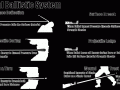
Advanced Real-Time Bullets
- Complex Bullet Ricochet / Penetration / Bore / Exit
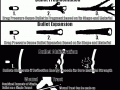
- Projectile Fragmentation / Expansion
- Energy/Cavity Based Damage
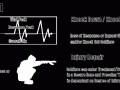
Simulated Body Health
- Vital Blood Loss
- Shock Response Recovery
- Bandage Repair
- Knock Downs/Knock Outs
Game Summary:
Engage in ultra realistic fire fights with AI and/or players in 6 Game Modes: Death Match, Team Death Match, Fallback, Surge, Hold and Control. Play with 3 possible Combat Profiles: Hollywood, Regulation or Realism. The ongoing mission of the OccupationCS Development is to capture the realistic dynamic, destructive nature of the Bullet in a fast paced dynamic combat environment.
Game Features:
Advanced Real-Time Bullets
- Complex Bullet Ricochet / Penetration / Bore / Exit
- Projectile Fragmentation / Expansion
- Energy/Cavity Based Damage
Simulated Body Health
- Vital Blood Loss
- Shock Response Recovery
- Bandage Repair
- Knock Downs/Knock Outs


Articles

OccupationCS: Source 3.03
The latest Orange Box version of OccupationCS: Source has been released.
It's a whole new game...
Real Time Projectiles, Cavity Based Damage, Physics Calculated Terminal Ballistics, Bullet Deformations. The Evolution of the First Person Shooter!
OccupationCS: Source 3.03 is the most efficient, stable version of OccupationCS to date. It captures the reality of armed conflict in a fast paced Single, Coop and Multiplayer First Person Environments. FPS Combat will never be the same again.
The latest version of OccupationCS: Source has been released, incorporating a range of updates and most importantly support for the updated Orange Box engine.
Most noticeably different is the updated spawn menu and weapon selection. Players can now select a class which has access to a particular range of weaponry. Once a weapon is chosen, players can select from a range of different ammunition types for the weapon.
New player models have been added with modular armor components, chosen by the player. Armor and Inventory are tied to the player's encumbrance system.
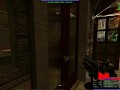
Take a look at OccupationCS's PvP Combat:
Download the latest and greatest here:
Moddb.com
Install in Steam\steamapps\SourceMods directory.
The Occupation: Source Dev Team
- are always looking to expand and improve. We are looking for developers in the following areas:
- Concept Artists - need to be able to draw some original yet realistic military personnel.
- Character Modelers - being able to work from concept art to produce realistic characters is a must.
- Mappers - should be able to create good looking, well optimized maps.
- Prop / Environment artists - prop artists are needed to create various props to detail the maps. Notable props would be Humvee, APCs, fortification details.
- Weapon modelers - should be able to work to a polygon budget to produce good looking and well optimized models.
- Texture artists

OccupationCS: Source 2.8.1 Update Patch Setup
NewsOccupationCS Update 2.8.1 Patch Setup updates version 2.7.1 and 2.8 to version 2.8.1. This update fixes Multiplayer client crashes and replaces 2.8 Update...

OccupationCS: Source 2.7.1 release
News 3 commentsOccupationCS Beta 2.7.1 is NOW Available 2.7.1 is a Full Install and replaces all previous versions. A clean install is required and will guarantee there...

Podcast17 - Transmission 11067
Feature 9 commentsWills and DogMeat from Jailbreak Source join us this week and we try out a new recording technique.
Files

OccupationCS: Source 4.1.1 RAR Install
Full Version 4 commentsCompressed RAR Alternative Setup. Extract to the "\Steam\SteamApps\SourceMods" Folder, Restart Steam

OccupationCS: Source 4.1.1 Full Setup Installer
Full Version 10 commentsVersion 4.1.1 stabilizes single and multiplayer play, implements the new Ballistic 2.0 SDK Libraries and implements easier in-game controls. See Detailed...

Map Manual, Example and FGD
GuideContains Occupation Map Entity Definition Word and RTF documents, the CobbleDepot Source Map and the FGD file
Post a comment
Profile
Icon

Game
Half-Life 2Developer
Ballistic SoftwareContact
Send MessageRelease date
Mod watch
Follow
X
Tags
Embed Buttons
Link to OccupationCS: Source by selecting a button and using the embed code provided more...






The mod doesn't work at all. Don't know how to fix it.
So, it's probably impossible to contact EnterpriseG about this mod.
Because I have some physics-related questions about ballistics.
Also, the mod could be good if there was core design that was neat.
9/11 for ballistics and 6/10 for whole mod.
We Still Live on and by that I mean we still Alive.
well i should say this is a gud game GG.
No other versions of OccupationCS are forth coming. Instead the ballistics have been ported in to the next version of WWI Source coming soon. OccupationCS got to big and to unfocused to continue moving forward.
Thanks for playing,
Occupation
How do I make this mod to work?
A bit late, but it's a shame to learn that the mod halted development.
I understand it grow big and partly unfocused, but that was more or less the strong point of it. It was more of a warfare/weapon/ammo sandbox than a gameplay-style driven mod, which made me love it. It was fun to go K.O because of a missed bullet, and that you could "fake" your dead with it.
The only encumbrance I would point were the menus, that didn't really specify why you could "buy" o not some kind of weapons/ammo, even if you didn't choose an specialized class.
I also felt a bit loss about what was happening on the big scene (which part of the map was beign captured, who was winning and why, etc), but besides those two points, I loved it.
Said that, I'm afraid I'm more into PvE (small human team against a bigger AI one) than pure PvP, so I'm not seeing myself near WWI anytime soon (Bots are something really neglected these days), but hopefully that will change.
Good luck with your works, and have fun.
Best wishes, a Occupation Source lover :).
You might want to take down the "This month Upcoming version 5.0" part of the mod's description
>This month Upcoming version 5.0 with all Player and AI DOD animations including prone. New Fire Control Code allowing AI to fire all weapons at proper Rates of Fire (ROF) with full Audio
When has this been posted? Is the release of 5.0 coming in October?
Any news on this?
I certainly hope so. It's seeming unlikely at this point, but anytime soon would be amazing!