Mod Details
The objective of the Killer App Mod for TRON 2.0 on the PC, is to incorporate elements from TRON 2.0: Killer App for the Xbox platform that were never released for the PC version of TRON 2.0. It also includes other fixes and additions for the game, such as 16:9 and 16:10 Widescreen support. New to Version 1.1a of the mod is compatibility with the Steam version of TRON 2.0, easier installation, v1.1 bug fixes, and restored Multiplayer support in-game on both the CD/DVD and Steam versions.
Installing and using the Mod
TRON 2.0 and the Killer App Mod will work on
Windows 98/Me/2000/XP/Vista/7/8/10 (both 32-bit and 64-bit in all cases).
Video showing easier installation and other features of v1.1a
If you can't get Widescreen working, or have ANY other problem,
visit the above troubleshooting link.
visit the above troubleshooting link.
Note that the Killer App Mod allows you to choose Français, Deutsch, Italiano, and Español text for use in the game, after you install the Unofficial v1.042 Patch. In other words: if you download and install the Unofficial Patch, you can later change the language from English. There is really no reason to use the Official Patch any more, on the CD/DVD Retail version of TRON 2.0.
If you want to use the User Error Single Player expansion in widescreen,
you must download and install it after you install the Killer App Mod.
you must download and install it after you install the Killer App Mod.
Also note that if you want to use Xistence's Ancient Disc Mod, you must download and install it first before you install the Killer App Mod.
When using Single Player with the Killer App Mod, older saved games will not work and loading them will cause the game to crash. You must either disable the mod to load old saved games, or start a new game. Since the mod fixes a few issues and adds some things: you will probably want to enjoy the new improved experience in Single Player from the beginning, anyway.
When using Multiplayer with the mod, EVERYONE must be using the mod in order to access the new features when playing together. This inculdes the host (server) and all players (clients). This new Version 1.1a of the mod is not compatible in Multiplayer with the older versions. (If you have an old version, you must uninstall it first.)
If you try to join a Multiplayer server not running the mod, you will be kicked off and the game will let you know why. If you cannot find any servers running the mod at the time that you want to play online, the mod can be completely disabled to allow you to play with others who do not have it.
If there are no servers running the mod: you will need to contact the server operators and request that they start using the Killer App Mod, or host your own server.
Please leave any comments or feedback on ModDB in the comments section, or the forum of one of the TRON fan sites. Do not use the "Send Message" link on ModDB, otherwise your feedback may not be read for a long time.
List of TRON fan sites:
Ldso.net
Tronfaq.blogspot.com
Tron-sector.com
Thanks from LDSO and the Killer App Mod team.
Team members and Contributors
9VoltChicken - New Character Skins, Weapon Skins, Game Fixes, Special FX, Quality Assurance
Avi - Quality Assurance
Dr. Cuddlebug - Quality Assurance
Jademz - Quality Assurance
Jumpy - Quality Assurance
Kain-Xavier - New Character Skins, Weapon Skins, Light Cycle Colors, Quality Assurance
Ms. Kay - Quality Assurance
Layer - Quality Assurance
Load "*",8,1 - Quality Assurance
Mangler - New Character Skins
Ronald Mercer - Qtracker GameSpy emulation
Mr. Anderson - Special thanks
Mor.Evil-1 - Quality Assurance
Myria - Quality Assurance
NetSlayer - Quality Assurance
Raven - Light Cycle Colors, Special FX
Schmatzler - Quality Assurance
Shock - Quality Assurance
Tetsue - Quality Assurance
TheReelTodd - Quality Assurance
TronFAQ - Game Fixes, Special FX, Coding, Light Cycle Colors, Quality Assurance
Void - Quality Assurance
VMan - Quality Assurance
WhiteRabbit - New Character Skins, Quality Assurance
Win3K - Quality Assurance
R. Young, High Resolution Icons
Zook_One - New Character Models, Character Skins, Artwork, Quality Assurance
Articles
TRON Maze Challenge - Response to Kevin Lambert and Killer App Mod v1.2 Preview Trailer
For the 18th Anniversary of TRON 2.0 (released August 26, 2003 in North America) I respond to a challenge from the Lead Programmer of TRON 2.0 (when he was at Monolith Productions), Kevin Lambert.
Time stamps of note:
- 00:02 - TRON 2.0 Lead Programmer Kevin Lambert's TRON Maze Challenge
- 00:47 - Response
- 01:29 - A trace of this idea left in the game
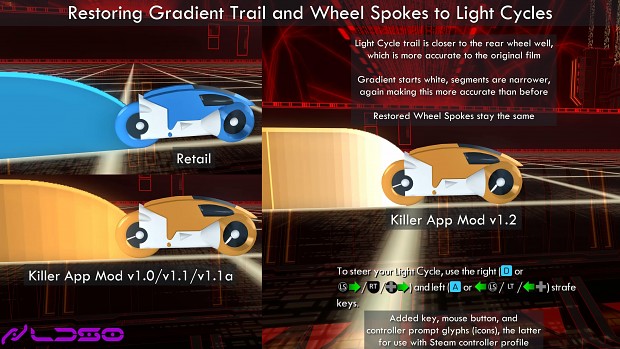
- 01:39 - Light Cycle improvements in Killer App Mod v1.2
Kevin asked if anyone could add a concept that was left out of the final game: Placing the player in a claustrophobic Light Cycle maze like the one seen in the original TRON film, with prompts appearing to let the player know when to turn (somewhat like how the game Dragon's Lair prompted the player when to move).
A fourth Killer App Mod v1.2 Single Player fixes trailer is still forthcoming. Consider this to be a "Preview Trailer 10.5". 🙂
Killer App Mod v1.2 will now include what's needed so you can make your own custom maps/levels to prompt the player to turn when riding a Light Cycle. And we'll most likely end up using this concept in User Error 3, LDSO's upcoming follow-up to the previous User Error 1 and 2 Single Player expansions.
One of the mandates of Killer App Mod v1.2 has always been to fix or enhance the Single Player campaign, a goal partly inspired by the similar (in purpose) System Shock 2 Community Patch (SCP).
You can also check out other new features in v1.2, from an earlier news post.
If you want to see even more frequent Killer App Mod v1.2 progress updates, visit the LDSO Twitter account: Twitter.com
Thanks from the Killer App Mod team, and if you have any questions or comments: visit the LDSO message forum, the TRON fan sites, or leave comments here on ModDB. Do not use the "Send Message" link on ModDB, otherwise your feedback may not be read for a long time.
List of TRON fan sites:
Ldso.net
Tronfaq.blogspot.com
Tron-sector.com
TRON 2.0: Killer App Mod v1.2 - Demoing Single Player Fixes
News 6 commentsThis third trailer showcases more of the fixes to the Single Player levels of TRON 2.0, via the upcoming Killer App Mod v1.2.
TRON 2.0: Killer App Mod v1.2 - Demoing Single Player Fixes
News 5 commentsThis second trailer showcases more of the fixes to the Single Player levels of TRON 2.0, via the upcoming Killer App Mod v1.2.
TRON 2.0: Killer App Mod v1.2 - Demoing Single Player Fixes
News 1 commentThis trailer showcases many of the fixes to the Single Player levels of TRON 2.0, via the upcoming Killer App Mod v1.2.
TRON 2.0: Killer App Mod v1.1a Released
News 13 commentsNew to Version 1.1a of the mod is compatibility with the Steam version of TRON 2.0, easier installation, v1.1 bug fixes, and restored Multiplayer support...
Files
TRON 2.0: Killer App Mod v1.1a
Full Version 22 commentsNew to Version 1.1a of the mod is compatibility with the Steam version of TRON 2.0, easier installation, v1.1 bug fixes, and restored Multiplayer support...
TRON 2.0 Killer App Mod and User Error 2 Release T
TrailerRelease trailer for the TRON 2.0: Killer App Mod and User Error 2, which are fan-made modifications for the PC game TRON 2.0 released by Buena Vista Interactive...

TRON 2.0 Killer App Mod Preview Trailer
MoviePreview trailer of the TRON 2.0 Killer App Mod, showing new Light Cycle Colors, new Multiplayer Characters, new Character Skins, and more. The TRON 2.0...
Post a comment
Profile
Icon

Game
Tron 2.0Developer
Killer App Mod TeamContact
Send MessageHomepage
Ldso.netRelease date
Mod watch
Follow
X
Tags
Embed Buttons
Link to TRON 2.0: Killer App Mod by selecting a button and using the embed code provided more...




Just shared some more Killer App Mod v1.2 updates on both Twitter and Mastodon. Will provide the link to the Mastodon account, because it's for mod updates only. (The Twitter account is where I talk about all kinds of things.)
Mastodon.social
I'll be posting updates here on ModDB again soon, as well.
Nice!
Awesome updates!
Looking really forward to Killer App 1.2!
Godspeed!
Heads up. The dev moved updates over here instead of twitter: Mastodon.social
Progress updates will continue to be posted on Twitter, for those who have an account there. (In fact, for anyone reading, I just recently posted my evaluation of whether or not making Windows 11 AutoHDR work with TRON 2.0 was something worth pursuing as an addition to Killer App Mod v1.2.)
But since I discuss other things on my timeline (mainly about other parts of the TRON franchise), I also wanted a way for people to see only the progress updates. So the Mastodon account will strictly be for updates.
But, honestly, with how restrictive Twitter is becoming unless you're a paying subscriber – can only read a limited number of tweets per day, putting TweetDeck behind a paywall, who knows what's next – and the fact that the Moments feature was removed (where I was able to collect mod progress updates into one place) . . .
I just recently found out Twitter has introduced a new feature named Highlights that's a replacement for Moments, or I could have used hashtags, but you know what . . . it's too late, and creating an account elsewhere is also my backup plan if Twitter eventually becomes nigh-unusable.
Just posted a progress update for Killer App Mod v1.2: Twitter.com
Will be posting more updates here on ModDB as well, in the coming months.
Looking to release an "Early Access" version of v1.2 that might not be 100% complete, in the not-that-distant future.
Thank you for a very welcome update on the development.
Where do you even download the latest version of this MOD, been looking for 1 hr now and still no obvios download button.
There's a link named "Files" on every mod page on ModDB, and there's also a section near the bottom before the comments that lists the latest files/downloads. But I'll post a link: Moddb.com