In the Call of Duty series the scripts are written in GSC files, these are controlling the gameplay. Certainly we are not allowed to modify a part of the game, which is hard-coded in the engine, but you can solve almost everything if you are creative, and you know some tricks. As default, these scripts are in the maps folder, but you can work in a different one too. You can open these files with every text editor, but I recommend using Notepad++. With this, source codes are clear, because it supports the coloring of many programming languages, and other comfortable functions. Since GSC is C based, select one of the C languages (C, C#, or C++) from the Language menu.
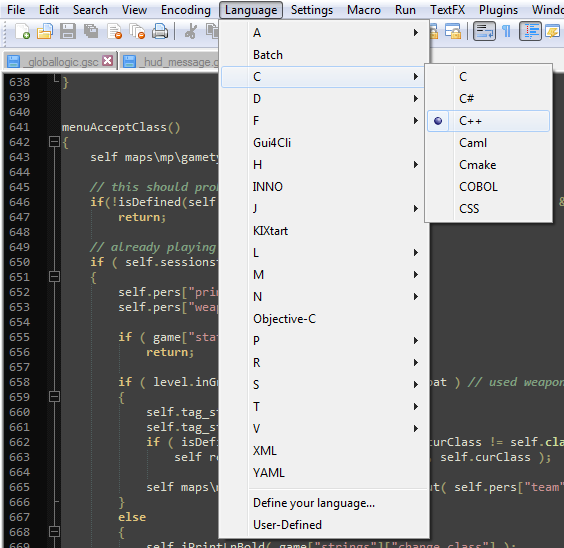
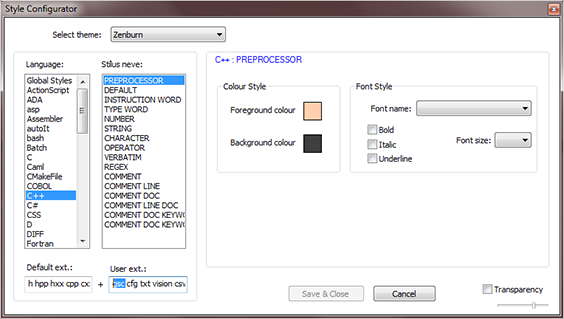
To make your life easier, you can associate the GSC files with this program, so opening these files will use Notepad++ as default. In addition, you can also define the default coloring, so you won't have to select it always. For this, go to Settings->Style Configurator..., select your C language from the left, and write gsc in the User ext. field. You can define more, separated by whitespace.
To understand my script tutorials, you should have some basic programming knowledge. I'll try to write as many things from the basics as I can, but I won't be able to teach you the logic of programming with just some tutorials.
The most important script behaviors:
- The engine will process every code from the left top, to the right bottom
- Every statement have to be closed with a semicolon
- If a GSC exists in your mod, which is also in the default game, then yours will overwrite the existent one; which is not in your mod, that will be loaded from the default game



Hello,I am Tehnical Support of the clan [LMT] and we have developed a lot of scripts which work in Call of Duty 4 but in normal servers(without mods,cracked). I am saying this because we currently want to make Call of Duty 5 serves,which we already started but we have problems with scripts,we don't know exactly which is the path where they should be installed so servers can recognize them... For example in CoD4 scripts are in the directory "main/maps/mp/gametypes" and that path doesn't work on CoD5. Any idea will help me. Thank you
I have never actually used CoD5, so sadly I don't know the folder structure, but you can check it out if you decompose CoD5 ff files.
This comment is currently awaiting admin approval, join now to view.
how do you script the files about IWD files? not like maps when you create IWD scripted and modded file