Hey guys! As most of you know there aren't a lot of options when it comes to animating if you want to make a quake mod like solitude, left4quake, etc. Most people use Qme, an old, out of date, simple program. I however, like to use a program called Blender 3d
Blender 3d is a constantly updated 3d modeling programing that can model, animate, render, texture, and more. I love Blender because it has many options and is easy to use(after some practice) This tutorial will show you how to get a model animated in blender, exported as an mdl, and added to kurok PC.
First of download Blender from: Blender.org
After you have downloaded and installed blender, you need to add the mdl export. Download this: Glbsp.sourceforge.net extract it and take the ajmdl_export_055.py and copy it into your script folder for blender. For me, the path is C:\Documents and Settings\Mitch\Application Data\Blender Foundation\Blender\.blender\scripts. After you have added that, you can move to the next step.
Next, download this 3d model that I made for you: Sendspace.com please note that I didn't take my time on this model and you can use your own if you'd like. After that's downloaded please double click it. Blender should open up and there should be a (cruddy) 3d pistol waiting for you! yay! you want to then right click where the 3d view and options meet and press split view. make a small split.
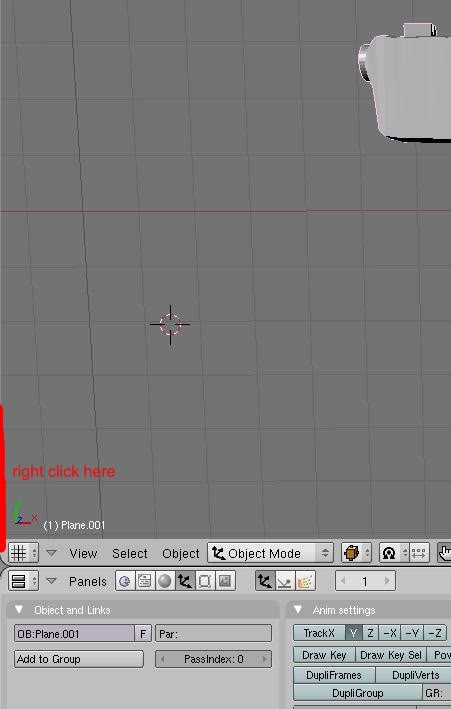
then click on the little box in the left corner of that. Split and go to timeline. It should look like this:
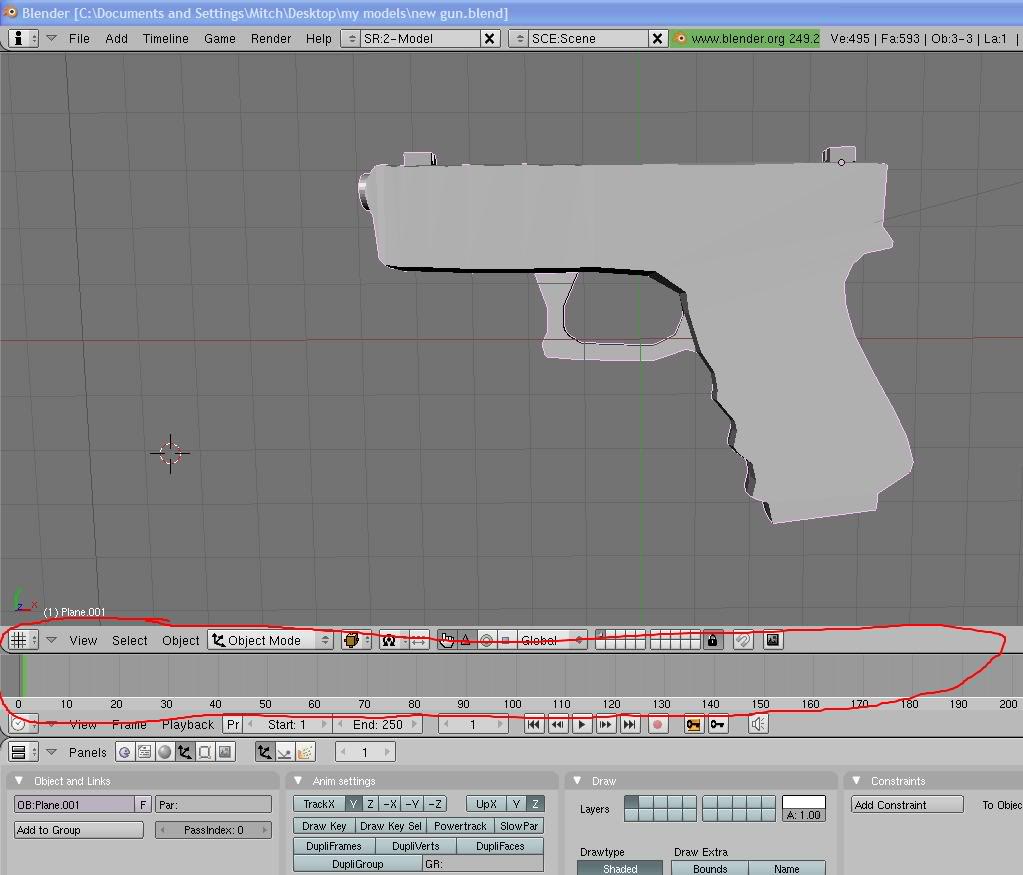
The timeline shows the animation all in all. What we'll do is make a basic animation that plays when the gun shoots in kurok. First press a so that everything is highlighted. Then press i and click locrotscale. This places a keyframe so when you get to that frame, the model will be at that position. Now go to frame 3. press r and rotate the gun upwards. This is the peak of the shot. Once again press i and click locrotscale. Now go to frame 6 and rotate the gun back to its original position. Press i and locrotscale once more. you can adjust it so that the animation ends at 10 frames. press the play button and itll shoot the gun over and over. You can adjust it how you like.
You also have to take into account where the gun will show up. Go to front view, and the model should be facing like this: 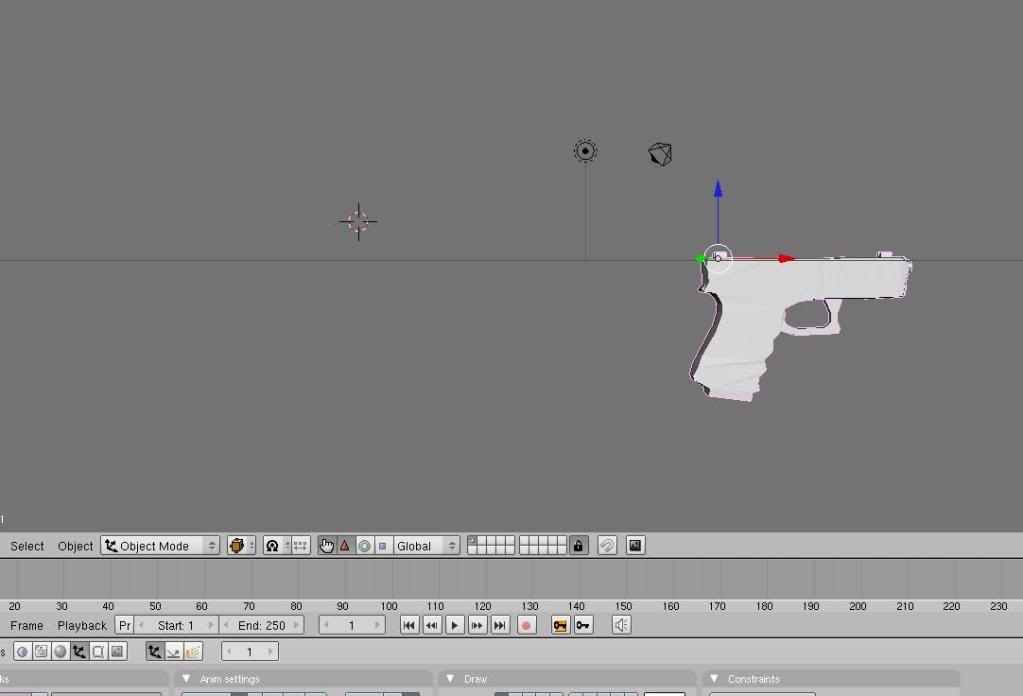 To tell the truth, it's all trial and error. If the gun doesn't look good in game, go back and reposition it until it does.
Now that the animation is finished we can export as an mdl. Please note that the model MUST have a texture or the export WILL have an error. There are tutorials on how to add textures whether you want to unwrap it, or select faces and add it. Make sure you are at frame 7. The exporter will take 6 frames if you are on frame7, 7 if you are on frame 8, and so on. Now right click the model and go to file on the top left of the screen. 
Click on export after that, then click mdl after that. note their are two mdl options. choose the one farther down in all caps. Choose your path whether it's to your desktop, c drive, or what, name it v_shot.mdl, then press export. It'll look as if it froze up but after a couple seconds it'll be done and you can press the button that appears to exit.
Now find the mdl on your pc. You now need a program called Pakexplorer. this opens pak folders which kuroks progs, or models, are stored in. Quaketerminus.com
install it and move on.
Now go to your kurok pc folder, and navigate to where you see pak1, 2, and 3. double click pak2 and go into the folder titled progs. Copy the v_shot.mdl you made in blender to this folder and replace the original. Wala! You can now run kurok, get the pistol, and shoot around.
Now that you have the basic idea of animation, you can move onto more complex things like the reload. There are different hotkeys for different uses like r for rotate, s for scale, g for move, and so on. There are many tutorials on these. When doing the reload, skip a frames after the shooting animation, and just start. Don't go over 30 frames for the entire thing unless you have a modified engine because kurok wont play the whole thing. If you have any questions at all let me know here and I'll help you. I can answer animating, texture adding, and even 3d modeling questions if you need. Hope this helped get a basic understanding of blender and its capabilities!
thanks
-Mobster








This is a different export script right? Since the one I know from Blender works with shape keys not skeletal animation. Quake itself doesn't know skeletal animation hence I assume the export script simply stores for each frame the transformed vertices of the mesh, right? Does it also support working with an actual Armature attached and the vertices being weight painted? This would be the pinnacle :D
well in blender you can rig up your model and animate it. then after exporting to a quake mdl, it won't take the rig itself, but it'll take each frame that the rig was set to. if that makes sense...
Please answer this I really need help: great tutorial!
Please tell me how I can make the hands have frames too, because I made a full model with imported hands in blender and then I exported to mdl, but when I open the mdl with QME, I only get the gun. Then, I tried exporting the left hand, the right hand, and the gun seperately and merge them with QME. It worked, but then when I play the frames, only the original model(the gun) moves, and the hands stay where they are.....how can I export what I see completely in blender ALL into a MDL with ALL of its frames together with it?
You need to join the meshes in blender then assign bones to animate it
Nice tut ^^
thanks :)
Can you post any new weapons or can you put up a tutorial on how to make weapons?
I kinda need this for Timesplitters PSP. =/
there are many tuts online on how to model
Alright i'll check them out.
Thansk for the tutorial though. XD
haha welcome
so :o i dont have any experience of this coding but this feels simple task if i read this manual carefuly does that mean i can do this ? I am pretty good in computer things and willing to learn much more
Only thing what i can say as experience is that i used one maping (making maps) software and those maps were comptaptible (eh hard word) to halflife and if this is good for me can you tell where would be nice modeling software and skining software or any youtube tutorials ?
wings3d is pretty good for a burgeoning modeler. it's useful for making low-poly models and has a very minimalistic gui.
i think blender can skin, i'm not sure. it can animate, so i assume it could skin.
A great tutorial, it is the best tutorial for export mdl. There are few ways to do this, and this is the best. Good job XD
Thanks you very much! Anyways yes blender can also skin
huh i have problem, i cant make wapon to the propper origin :S
Awesome tutorial mobster. I was tired of using that terrible qme program. You think you could make a tutorial for texturing?
Ehh I can't make the texture but i can add it to the model if thats what you mean
Reminds me of a tutorial I once wrote, except mine is funnier and has emphasis on things
The MDL exporter has bugs, it shifts UVs 1 pixel up and left, as well as flipping the texture
mobster thanks for the tutorial :) i was really needing something like this :) take care
no problem man :)
what version do u have?
is this only for quake mods?? because im trying to model for a hl1 mod at the moment and milkshape completely sucks when it comes to animation. does this export to half life smds too??
yes it will export to hl1, but it's a different script