
In this tutorial, you will use brush based entities to add precipitation to your map, either rain, snow, or falling ash. This is a relatively simple process, but this tutorial assumes intermediate skill in Hammer.
Create a basic map of any size.
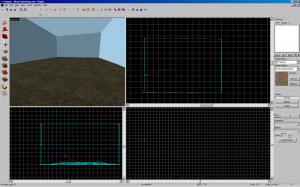
Using brushes, create a simple structure in the center of the map. This will be a shelter from the precipitation.
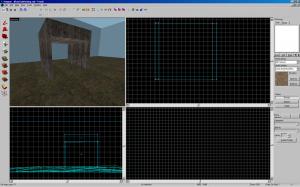
Next, create a brush textured with “tools/toolsinvisible” covering the entire top half of the map, stopping at the roof of the structure. (A skybox wall in the picture is cut away)
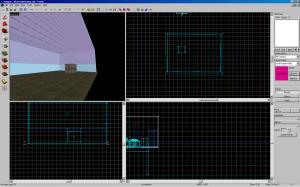
Using the clip tool, section off the brush and drag the portions down so that the invisible brush covers the entire map, except for underneath the structure.
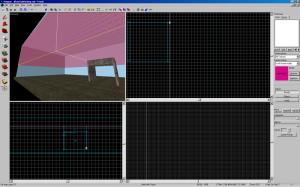
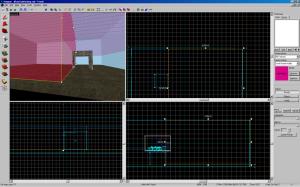
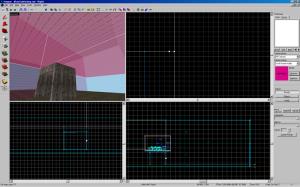
It may look awkward, but it’s ok if the brushes overlap a bit.
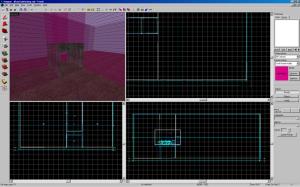
Control+click to select all of the invisible brushes and tie them (control+T) to a func_precipitation entity.
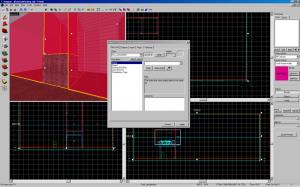
They will now become boxes in which the precipitation will fall. It’s important to note that the precipitation will not fall FROM the boxes, it will fall IN the boxes. Select which kind of precipitation you want under the “Precipitation Type” box.
With all of the brushes still selected, make them hollow with Control+H and enter 2 as how thick you want the walls. Remember, it’s ok if they overlap.
Add an “info_player_start” and test the map.
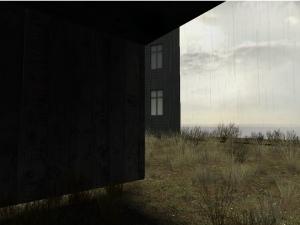
If you’re doing snow or ash, you’re finished. If you’re doing rain, you’re almost done. The last thing to do is add an ambient sound, because it looks a bit strange to see rain and not hear it.
Create an “ambient_generic” somewhere on the map. Name it “RainSound”, and select the “Play Everywhere” flag. All other flags should be unchecked. You also have to set the “Sound Name” property. I like ambient/levels/canals/dam_water_loop2.wav for heavy rain, but you can choose a different sound if you want.
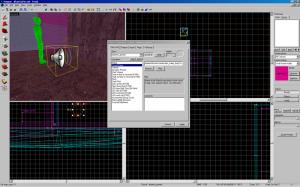
You’re done! Precipitation is a great mood setter when used sparingly. I’d recommend using an “env_fog_controller” for heavy rain to make it look a bit better.
For questions or feedback, you can email (hambandito@gmail.com) or PM me.



A soundscape is far more useful than an ambient_generic, unless your map is entirely outdoors and the rain sound never changes.
I don't understand why you hollow the brushes? You'd want rainfall in the middle of the brush too! :)
It's just always worked better for me that way. Even if the brushes are hollowed, the precipitation still falls inside the box.
Yes, a soundscape would be better, but they are much more complicated.
used a soundscape to add random thunder, it's really moody that way, thanks for the tut
Hi,
i was wondering how did you get the grass on the floor of the map?
If its an Entity could you tell me which one and which type of grass you used.
Thanks
The grass sprites come with many of the grass textures, but they only show up when you run the map. I've used nature/blenddirtgrass001.
Thanks Psalm.
Nice Tut!
Ok I must be a complete noob but I couldnt get it to work.. I even simplified it..
Hollow box level, player start point,box for precipitation with invisible texture and CTRL+T precipitation to it.. I have an empty box level with nothing but me in it :S
I cant get it to work either. I tie it to func_precipitation change any of the settings and click apply. BUT when I try and hollow the brush it disappears??! Also I am getting a bmodel 2 has no head node error. Any ideas whats going wrong?
Still a great tut tho mate :)
Nvm, I got it. I had to leave out the hollowing part of your tut cus it jus wasnt working for me. I textured the brushes/entities wrong. Works fine now!
Noob mistake lol
Thanks!
Thanks man!
thank you so much.