[page=Introduction]
Do you have a cool skin that you want Alyx to use? Or have you got the mission to make a cool skin for your clan? Don't worry, Mauritz will help you.
[page=What you need]
To edit a skin, you need GCF Scape, VTF2TGA and VTF Tool.
GCF Scape is very useful if you want to look in the GCF files that Steam uses.
VTF2TGA will be used to make the VTF files (skins) to TGA files that you can edit with an image editing tool, such as Photoshop.
You need VTF Tool to make your finished TGA files to VTF files.
Place you files in a folder, so you can find them easily.
You must have Source SDK installed properly to use VTF Tool.
[page=Let's start!]
When you are ready, start GCF Scape and browse for "source materials.gcf" by pressing "File" and after that "Open".
The GCF files are in your "SteamApps" directory, e.g C:\Valve\Steam\SteamApps.
The window should look like this now:
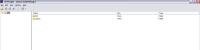
Click on the small icon that says "root". A lot more icons should appear now. Press "hl2" and after that "materials". Click on models.
If you have done it right, the window should look like this.
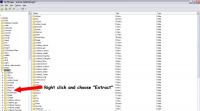
Then do as the image shows you; right click on the "Breen" folder and choose "Extract".
Choose which folder you want to place the files in, e.g C:\My Skins.
When it's finished, go to the folder where you extracted the files. There should be 17 files
there. If not, extract the files again.
Now, it's time to make the VTF files to TGA files. To do this, you have to unzip the Zip file that contains VTF2TGA (vtf2tga.zip). Extract the files to your skins folder.
When you're finished, it's time to open the file vtf2tga.bat. It will make the VTF files to TGA files.
When it asks if you want to delete the originals, choose "Yes".
The VTF files should have been replaced by TGA files.
It's now time to edit the skins.
[page=Editing and making the skin appear in-game]
Open the file "breen_face.tga" with your favourite image editing tool and draw something on it. I made some glasses for him.
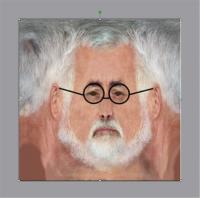
Save the image over the old image.
Now, it's time to convert the TGA file to a VTF file. Do this by using VTF Tool.
VTF Tool must be placed in the sourcesdk\bin directory (e.g C:\Valve\Steam\SteamApps\*your_account*\sourcesdk\bin)!
Start VTF Tool. It should look like this:
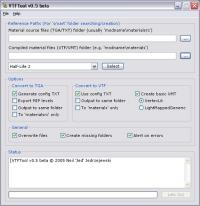
It's time to set the directory where your TGA file is placed and where you want the VTF file to be placed.
Do this by using the first two fields in the program. To make this easy, I'll write C:\My Skins in both fields.
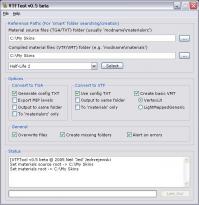
Press "File" and "Convert to VTF". Then choose "File...".
It's now time to choose your TGA file. Press "OK" when you have chosen the file.
Click on the "Let's Go" button that's placed down in the right corner. When the program says
"Converted: OK!" your VTF file is ready.
There are only a few thing remaining.
Copy the VTF file to hl2\materials\models\breen in your Half-Life 2 folder. If the directory doesn't exist, you have to create it manually.
Don't forget to take the VMT file, which is needed for the skin to work, with you. In this case it's "breen_face.vmt" (the VMT file is in the folder where you have the TGA files)!
Start Half-Life 2 and look at your work.

[page=The End]
It's almost the same for Counter-Strike: Source and all Half-Life 2 mods.
This is my first tutorial ever, and I hope you like it.



Also for those with Photoshop too lazy to use VTEX get nems photoshop plugin in and save vtf files like you save any normal files.
It can be found here
Nemesis.thewavelength.net
Thanks. Really needed that. I don't really feel like downloading a load of crap when I have photoshop x3
Great Stuffie. Didn't know that (I don't use Photshop :P).
If you don't use it you can use Microsoft paint. I prefer photoshop unless it is a joke or your trying to make it like that on purpose
when i try to run GCFscape it says required dll missing or something like that, what the hell am i supposed to do?
Install .NET
Good tutorial!! Now i know how to skin!!
Dr. Breen is so emo!
Yeah, his existance is worthless! He might aswell kill himself... well, he don't need to, because Gordon Freeman is in town!
No, he doesn't need to because he has teh über cool Harry Potter glasses!
oh.....Dr Breen in my game's Naked
every time i try to run "source materials.gcf", on GCF scape, it tells me "This proccess cannot access the file beacuse it is being used by another proccess", what the heck do i do?
Disable Steam (go to the bottom right corner, find the steam image, click right and then exit).
You must exit Steam before running GCF Scape.
where do i get the sourcesdk??
Start Steam, and in the main window, click on "Tools". Then you'll just have to double-click on "Source SDK" and follow the instructions.
Ummm I followed all your instructions and it was going great but with the last bit and putting the edited files back into the game I cant make it work because everything is in a wierd format which I can only access using the GCFScape and I cant find how to paste files into the folders! HELP ME PLEASE!!!
You dont actuly need to get the VTF2TGA and VTF Tools. All you need is a programe called VTFEdit. This does the job of VTF2TGA and VTF Tools. And was breen such a gimp in Half-life, coz i havn't played it.
THANK YOU SO MUCH FOR POSTING THIS TUTORIAL IT HELPED ME SO MUCH
NOW I CAN MAKE GREAT SKINS WOOT
THANKS AGAIN
I seem to have the same problem as AkinderSuerprise does.
In the image where you say to extract the Breen folder, well, I can't find it? Help please
This has helped me made a skin for Dr.breen, and now hes an albino
can you plz show me how to transfer the tga file to vtf file BY using VTFEDIT
Does it show up like this in gmod?
ok i did all the stuff that said on it a problem though i try to click the breen face for the next step and it says "Failed to shell execute C:\DOCUME~1\Rob\LOCALS~1\Temp\Breen_Face.vmt File Type has no default program associated with it. ... like what should i do i've already tryed a few things but still nothin..
I get as far as this part
"Press "File" and "Convert to VTF". Then choose "File...".
It's now time to choose your TGA file. Press "OK" when you have chosen the file.
Click on the "Let's Go" button that's placed down in the right corner. When the program says
"Converted: OK!" your VTF file is ready.
There's only a few thing remaining.
Copy the VTF file to hl2\materials\models\breen in your Half-Life 2 map. If the directory doesn't exist, you have to create it manually.
Don't forget to take the VMT file, that's needed for the skin to work, with you. In this case it's "breen_face.vmt" (the VMT file is in the map where you have the TGA files)! "
Then I get this error
The file or folder your trying convert isnt located you 'materialsrc' folder or one of its sub-folders.
Beacuse of this, the correct folder layout cant be re-created uder the 'materials' folder.
To avoid this error, either uce the "Output to same folder" or "To 'Materials' only" option.
i am not really sure how to put it ingame could u elaborate a little more on that part?
Guys, you're not supposed to put the final VTF file in the GCFscape thing, you have to go to steamapps/Username/Half Life 2/Materials/Models and then make a folder with the same name as the folder in GCFscape.
I Have a Skin Its a .vmt file how do i add it to half life?
Just continue. Breen apparently has more files than Odessa.
I noticed there were a lot of spelling mistakes in the tutorial, but I have hopefully fixed most of them now.
**** this this is so hard to ******* even relate to wtf you smart ******** are even talking about how about you try to make it a little more dam simpler so we're not here for 5 ******* hours trying to find some godam free programs that let us make some ******* ****
Skinning is so ******* easy. I have skinned every single model in tf2 in one week.
my Odessa FIle only has 16 things is that a prob or should I continue?
does anyone know how to Add skins? this method replaces old skins.. i want to keep both!!
How do you get the .vtf inside the sourcemodels.gfc?
And by the way, my VTF tool is not working, when i try to start it a error message that says that some strange thing is missing pops up, How do i fix that?
i made gman a purple suit case! and hair!
how do i make custom modles for guns? not just skins
Nice tutorial man
All of the files in the Breen folder are .VMT files?
Thanks for the help, I will use this for my mod, ;-D
bad news guys, this method gives you the old checkerboard, I'll try and figure out the problem, till then, you guys try and help out...
Oops, sorry for the scare guys, yes, this all works fine, but I would recommend using vftEDIT, vftTOOL is out of date...
Thanks!
Thanks! Very useful for mods! Realy easy!
I followed this whole tutorial, but I spawned the model I edited (it was for his face) and when I spawned his ragdoll in Gmod, the head (not the body) was in wireframe form. Anyone else get this problem?
Plz help ME!!! I want to try this with a zombie classic but when I extract to my skins from gcf scape I get a huge error on gcf scape. but it does extract to my skins. when I extract the VTF stuff and open the vft bat I get a microsoft error: VTFTGA.exe has stopped working. PLZ HELP ME!!!!
nice tutorial
ugh. Now I just know I'm going to waste my summer away making Half Life skins. Ah well.
This comment is currently awaiting admin approval, join now to view.