
[page=Introduction]
I'm going to walk you through creating your first weapon. To do this I'm going to show you how to make a clone of the pistol weapon which you can later customize.
I'm going to be using Microsoft Visual Studio .NET 2003 to compile, but if you are using Microsoft Visual Studio .NET 2005 read this tutorial.
[page=Opening and Copying]
Open up "Game_HL2-2003.sln" (or Game_HL2-2005.sln) in your Mod/src directory. Navigate to "weapon_pistol.cpp" in server_hl2/Source Files.
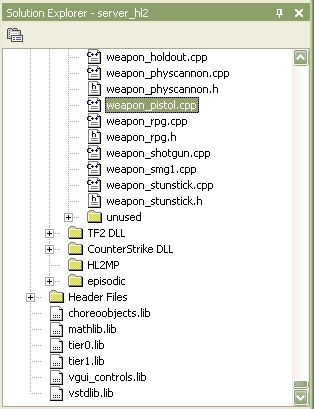
Open up "weapon_pistol.cpp" then Select All (Ctrl-A) and copy (Ctrl-C) the code. Now right click on the "Source Files" folder icon to bring up a drop down list. Select Add > Add New Item...
This window will be brought up:
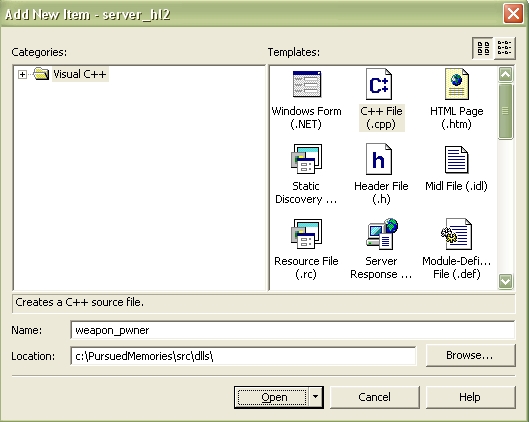
In the name field type "weapon_*desired name*" In this case I used "weapon_pwner." Click Open and a file called weapon_pwner.cpp will be created and opened.
[page=Pasting and Editing]
Paste all the code from "weapon_pistol.cpp" (Ctrl-V) in the new file. Now is the long tedious part ;) Open up the find box (Ctrl-F). Now, type in "pistol." Go through the file and replace all instances of "Pistol" with "Pwner." Be sure to use the same capitilization schemes, Pistol would be Pwner, PISTOL would be PWNER, pistol would be pwner.
Watch out, some of the instances of Pistol in the file are links to sounds and animations. DO NOT REPLACE THESE.
Before we compile there is one more thing to do. Open: Client > Source Files > HL2 DLL > c_weapon_stubs_hl2.cpp. Find the line:
STUB_WEAPON_CLASS( weapon_pistol, WeaponPistol,C_BaseHLCombatWeapon );
Copy this and paste it under itself and change it to:
STUB_WEAPON_CLASS( weapon_pwner, WeaponPwner,C_BaseHLCombatWeapon );
[page=Compile]
We're almost done now.Before we compile we have to configure the compile. Go to Build > Configuration manager... and change the drop down menu selection from "Debug HL2" to "Release HL2."
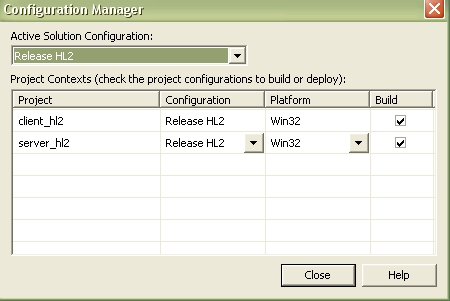
Navigate to Build > Build Solution and click it. You will most likely come up with some errors at fisrt. These are probably mistakes you made in "weapon_pwner.cpp" Double check to see that you didn't replace the animation and sound names, then compile it gain.
NOTE: If this is your first compile it will take a long time. This will not happen in the future now that you've compiled it once.
[page=Last Thing]
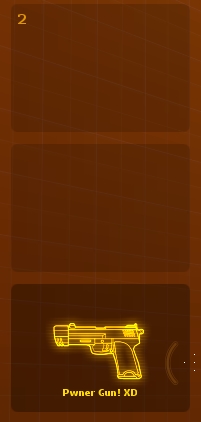
One last thing before you can see your new weapon. Navigate too your mod scripots folder. In my case it was located in: C:\Program Files\Steam\SteamApps\SourceMods\*the mod*\scripts). Copy the file "weapon_pistol.txt" and paste it in the same folder, but rename it "weapon_pwner.txt" Go into the file and change the bucket_position to 2 (this is the position on the drop down menu of weapons). Also, change the "printname" from #HL2_Pistol to #HL2_Pwner.
Now, go to C:\Program Files\Steam\SteamApps\SourceMods\*the mod*\resources and open "*your mod*_english.txt" Under:
"HL2_Pistol" "9MM PISTOL"
type
"HL2_Pwner" "Pwner Gun"
(or desired display name in-game).
[page=All Done]
Go to your mod folder and run "run_mod.bat" Now in the console screen open up a map (type map *your map name*). Bring up the console in the level and type "give weapon_pwner" and you will have your first weapon :)




OMG, i would not have known how to get my custom weapon working with out you telling where to register the new weapon, c_weapon_stubs.cpp you just saved me about 2 hrs of looking. thank you, super tutorial!!! keep making more of these!!
Great tut, though if you want to edit damage, you need to do a bit more. You have to find the code file that edit the code for the weapon settings you can edit in skill.cfg (Hope you got that). It's one code file where you may find
sk_plr_dmg_pistol etc
and such (I think). Just copy the pistol settings to the next line and edit ALL of them so it says pwner instead of pistol.
e.g.
sk_plr_dmg_pwner
Now just go into skill.cfg (Usually in YOURMOD/cfg/)
and add
sk_plr_dmg_pwner "6"
sk_npc_dmg_pwner "6"
sk_max_pwner "150"
Done!
(Please can you refind the file to edit the common weapon properties as I forgot what it's called :(. Try searching for 'pistol')
Thanks, very helpful. How do you change the weapon selection icon for your weapon though, I think it's to do with the HalfLife font but how do I access it?
And for some reason adding my weapon has changed the number font on the hud (which I changed previously), how do I fix this as I don't see what I've done to affect fonts.
Thanks!111....
1 thing...
Were do i get Microsoft Visual Studio???????
would be apreaseated
thanks
just search it on google. It's made by microsoft, so it's probably on their website.
U Have To Buy It
Its Dear But Theres A Express [Free] Edition But I DOnt Know If It Works With This
Express version for Visual Studio works with HL2 and Orange Box, I am using it right now!
The version that costs money is really only for big studios. There is no reason to buy it, since it doesn't have any features you would use to make Source engine mods anyway. Plus, it costs a LOT of money and is a HUGE program.
It fails now wit something about DTClass. Help
i cant find the last file C:\Program Files\Steam\SteamApps\SourceMods\*the mod*\resources
i only see resource and the _english.txt isnt there
Have you ran the mod before?
Im getting the same thing, I ran the mod but I still don't have the txt file.
(buried)
This tutorial sucks.
Great tutorial. "Client missing DT class CWeaponPISTOLBARN" Just ******* great.
Yay i finally did it, worked just fine after the requirements for visual studio 2008
I need HELP! I don't know whats the good changes in the weapon_(name).cpp .
HELP ME PLS...
SOMEONE plz help me with this, i build the bitch then when i run the mod I get "Client missing DT class CWeaponWEAPONNAME" (not the actual name). Is it because im trying to make a mp mod? - someone help me out.
Btw I have virtually nil understanding/skill in c++ etc.
in the orange box sdk there is no file named c_weapon_stubs_hl2.cpp
is this vital? please help
doesnt mind you should change the weapon stub file name from c_weapon_stubs_hl2.cpp to c_weapon__stubs_hl2.cpp
^^
2 underscores
Dude I tried with a crowbar and loads of errors I can't seem to do it. I don't know which ones to to be crowbar and which ones to be axe. what are the things yuor supposed to keep cause then I get errors of .obj files. help plz and help the other guys.
1>weapon_gauss.obj : error LNK2001: symbole externe non résolu "class ConVar sk_plr_dmg_gauss" (?sk_plr_dmg_gauss@@3VConVar@@A)
1>weapon_gauss.obj : error LNK2001: symbole externe non résolu "class ConVar sk_plr_max_dmg_gauss" (?sk_plr_max_dmg_gauss@@3VConVar@@A)
For my gauss gun, i don'( understand, what is the problem !!
ARGH i made mod at orange box engine and i dont have src folder inside my mod folder O_O whats wrong? please reply , i really want to learn about this :(
You probably found out by now, but the SRC folder is in the the folder where the mod is originated. (Meaning the first directory you had to type in.).
to anyone who has this problem:
Client missing DT class CWeaponWEAPONNAME
you should edit c_weapon__stubs_hl2.cpp
like it says in the tut:
"Before we compile there is one more thing to do. Open: Client > Source Files > HL2 DLL > c_weapon_stubs_hl2.cpp. Find the line:
STUB_WEAPON_CLASS( weapon_pistol, WeaponPistol,C_BaseHLCombatWeapon );
Copy this and paste it under itself and change it to:
STUB_WEAPON_CLASS( weapon_pwner, WeaponPwner,C_BaseHLCombatWeapon );"
check the "if" wich determines if the games is multiplayer or singleplayer
Is there any tool I can use other than Microsoft Visual Studio. When ever I look up Microsoft Visual Studio I get Basic and C++ and stuff. Are those what I need to do this or can I use something else?
Okay I fixed my other problem but I was wondering where exactly Game_HL2-2003.sln is?
What if there is an #include "weapon_crowbar.h" should I change that one too and then create the header file?
(I didn't mean to reply to knightcrim..)
how do you do this in the first half-life?(not source)
Still some way to go before npc's :D
i cant find c_weapon_stubs_hl2.cpp ! can you help me please?
What version of Microsoft Visual Studio 2010 express works best for this?
i need help with a awesome mod and i need people to help me i will credit the people who help me with it is a multiplayer game that will have the tf2 buildings and weapons and have the portal gun i will need people to make cp maps like for example the tf2 maps and to get the things like the dominating sound from hl2dm and the tf2 lady audio thing
oh and i forgot to say the mods name it's going to be called HTFL
or Half-TeamFortress-Life
i all ready got it started and running
So how do we replace the model of this weapon without replacing the pistol model?
hey i don't understand where to compile it to
Extremely useful but needs some revisions.
Can this be done with NPCs?
I feel stupid, I accidentally replaced 2 smg1's with SMG2's so it gave me an error! ME STUPID
Can someone updae this to where you can use the latest Software?
Would it be possible to use this technique to modify already-existing weapons (instead of creating new ones)? I'm asking because I was going to change the SPAS-12's secondary fire to toggle between pump-action & semiautomatic mode.
This comment is currently awaiting admin approval, join now to view.
countless errors after compile. when I try to run the mod I get this:
Set motd from file 'cfg/motd.txt'
Set motd_text from file 'cfg/motd_text.txt'
Dead end link: K2
'blackout.cfg' not present; not executing.
DataTable warning: No matching RecvTable for SendTable 'DT_WeaponHandgun'.
Client missing DT class CWeaponHandgun
Host_EndGame: CL_ParseClassInfo_EndClasses: CreateDecoders failed.
Don't know what to do... Please help anyone! :c
Does this tutorial work for Half-Life 1?
nopenopenopenopenope nopenopenopenopenope nopenopenopenopenope nopenopenopenopenope
Can I do this if I have windows 7?
i cant find Game_HL2-2005.sln
Does this work with visual studio 2013+?
no, this is an outdated tutorial for the old source engine.
I provided some info about sdk 2013 on the next page ;)