
So, first, most important thing you will need is StudioCompiler, which is a software that give StudioMDL and Vtex a GUI.You can download it here : Chaosincarnate.net
Once you downloaded it, you have to extract the files in :
C:/Program Files/Steam/steamapps/username/sourcesdk/bin/ep1/bin.If you have any bug, go to
C:/Program Files/Steam/steamapps/username/sourcesdk/launcher/GameInfo.txt, open it, and change ToolsAppid from 211 to -211, this should work(I hope).
So, once you done all these steps, create a shorcut of Studiocompiler on your desktop, and open it, you should have this :
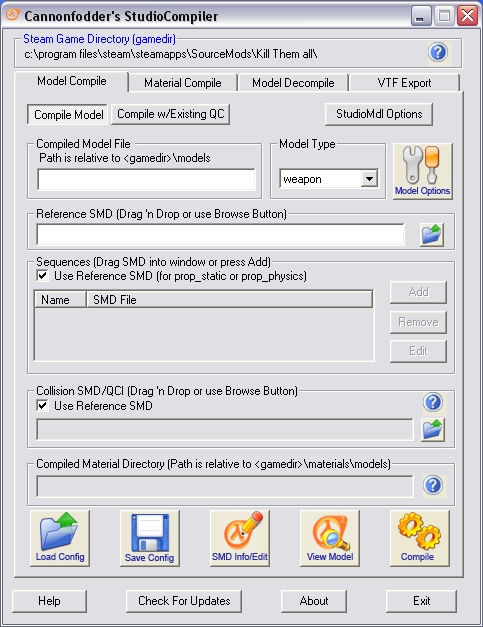
This screenshot shows the model compile tab.This is the graphical interface for studioMDL.
For this tutorial I will use a table i made.(or you own model).After having exported the 3 SMD's (table_ref, table_phys, table_idle), you have to type table.mdl in the Compiled Model File. and drag the table_ref in Reference SMD.Set the Model Type to prop_static, in Sequences, check "Use reference SMD", and in collisions, drag the table_phys SMD.
you should have this :

Then, click compile!
You model is now ready for source, you can click view model in StudioCompiler to open HLMV(Half-Life Model Viewer) and see...that there are no any textures !!
So let's texture !^^
Go into the material compile tab in StudioCompiler.In shader choose the shader VertexLitGeneric if you want a model texture or LightMappedGeneric for a map texture.Same thing in Compiled Material Directory , choose materials/models for models and materials/ for map textures.
in our case we will choose VertexLitGeneric, choose material/models, and type table under Compiled material directory.Then drag your TGA textures in Materials.
You should have :
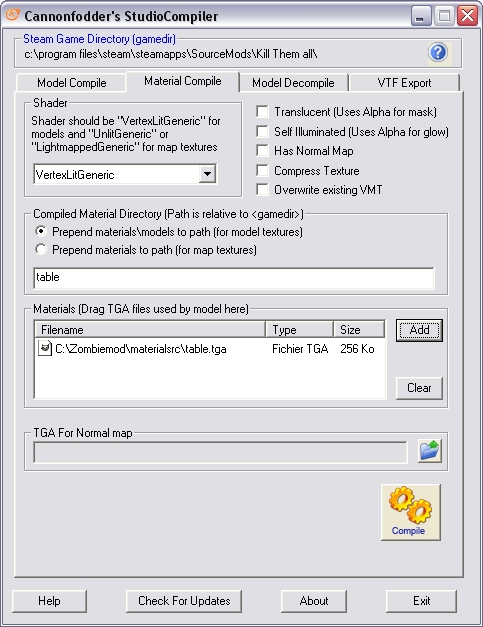
Then Click Compile.If it works, you should have this :
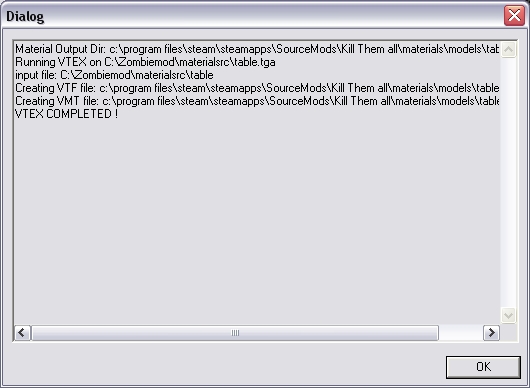
(Sorry for mistake)After having compiled your textures, go back to the Model Compile tab, and click again compile.Click on View Model, click File -> Load model..., and type table.mdl and there you should have your beautiful model !





this is a good tut but it dosnt explain what most of us are having trouble with -- getting MAX to SMD properly, especially with animations. That is the tricky part.
Dude here is where you can export from max into an smd
Wunderboy.org
This tut is marked as not related to any game, even tho it's HL2-related, is that fixable?
Nice tut, might try modeling again some time, just don't have the inspiration. Anyway, if I do, this might come in handy... :P
ummm, this is what happens when i click on the desktop shortcut, this is what i see for a spilt second, please help me!
link to what i see: I31.tinypic.com
For studiomdl you need to run it through command.
How to:
Start > Run > cmd.exe
Open the folder with studiomdl in and then drag studiomdl.exe into cmd.exe then press space.
Go into your folder with the .QC file and then drag it into cmd.exe.
Press enter and you should see it compile the model.
Before someone comments; I don't care if the post was almost a year old, this could help others.
Goldendeed, you made a mistake. In my tutorial I said to create a shorcut of StudioCompiler, not StudioMDL ^^ !
Hope you can get a good object ! If you have any bug, see the beginning of my tutorial !
I know C4menace it seems that exporting a model for HL2 from 3DS Max is hard but I haven't got it, I use XSI Mod Tool, it's free, easy, and works great for exporting/modelling.
Ok, lol im so dumb, but "C:/Program Files/Steam/steamapps/username/sourcesdk/launcher/GameInfo.txt, open it, and change ToolsAppid from 211 to -211, this should work(I hope)." what if it dosent work? I31.tinypic.com
well, first, do you have sourcesdk (downloaded)?And I found this : "http://developer.valvesoftware.com/wiki/Talk:Source_SDK_Bugs#.22Extra_App_ID_set_to_211.2C_but_no_SteamAppID.22_Error" good luck
When i try to run StudioCompiler i get a error message that says that the program cannot start because vstdlib.dll is not found. Are there a way to fix this?
For the guy that said the vstdlib.dll was not found (well that was long ago, just for whoever has the problem) make sure that the directory it installs to is correct. Mine had valve/steam/etc etc in it, but my steam folder is not inside of a Valve folder, so I had to delete the valve part. Also, make sure to put your username instead of username.
Yes, since the orange box exists, the "bin" folder of sourcesdk changed.now, the real "bin" folder is in Sourcesdk folder/bin/ep1/bin <-you have to extract Studiocompiler here. Lots of people have bugs with this software but once it's installed, it's fantastic ! Good luck !^^
i downloaded and done everything right, but get an error when running it says Warning: falling back to auto detection of vproject directory. and the program just crashes. I'm also using windows vista.
Sorry, I looked everywere, i didn't found any answer
Oh everybody I found : before launching go into the directory of the game you set in source SDK and edit gameinfo.txt : add // befare ToolsAppId
dude!, ur the MAN!!!
that should work for cs:s too right?
when i open hlmv it says "unable to load manifest file scripts Game_sounds_manifest. how can this be fixed?
I need a tutorial to teach me how to make models npcs.etc or a program.
Plz I want to learn to make these things.
I'd sure like to know why StudioCompiler 0.4a doesn't work. At all.
Can I use this to compile a HALF- LIFE 1 Model? Please answer !
I dont see the (table_ref, table_phys, table_idle),anywhere and I'm a big noob. Help