PERFECT INTRODUCTION
DUDE! MODS! Sick. Perfect Stride is a Hl2 Ep1 mod. It's built around a glitch in hl2's movement? You skate around, which is hopefully engaging. Then there are orbs to collect and perfect strides to follow. Orbs are there to encourage you to get intimate with the map. Strides are there to introduce you to new ways of moving about the map. So it's pretty much all about the map. The better you know it, the more possibilities you have.
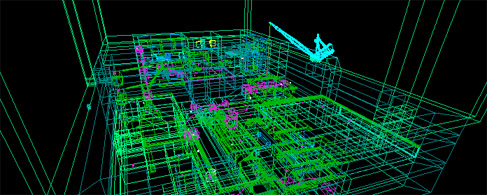
PERFECT SETUP
Any Ep1 map will work in Perfect Stride, but if you want to set up hammer to make it easier to develop, follow this article by raeven0. That's the legit way to do it. If you're lazy you can just copy your Episode 1 configuration and change the game path to $SteamDir\steamapps\SourceMods\ps and the build programs map directory to $SteamDir\steamapps\SourceMods\ps\maps and load your map from the console.
Keeping up a history of hacky games: there is no fgd for Perfect Stride. The logic is built with base entities.
Good: Easy to tweak per map, easy to customize game modes Bad: Painful to make consistent updates for levels. Worth it.
Download the Perfect Stride Prefabs zip, and drop the folder into your steamapps/username/ folder.
PERFECT BASICS
Build your geometry. Do whatever you want. There are no guidelines, don't even follow the stock levels. Those designs were arbitrary anyway. Make what you would want to skate on.
Build often and skate around in it. You just need an info_player_start. Use cordon bounds - don't bother to light it or seal it yet.
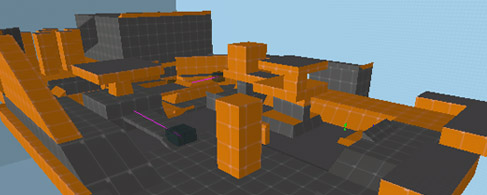
Once you like it, it's time to add the Essential Entities. Use the entity tool - on the right is the Categories box, choose Perfect Stride. In the objects, choose essential_ents. Place this set of entities in your map. Now ungroup them.
The point entities are logic and sounds. There is an orb here that will be used as a template to be spawned all over the level. The nodraw yellow box is what the player will spawn and wait in while the introduction plays. Move this box outside the level. Move the teleport destination to where you want the player to begin.
PERFECT ORBS
To start placing your orbs, use the entity tool and change the prefab to orb. Start placing them around (this is easiest in 3d view). Move them vertically where you like them and start doing some test runs!
PERFECT STRIDES
Strides work like this:
They are a series of trigger volumes that need to be activated in order within a certain window of time. Then a line of lasers is drawn through the volumes that indicate to the player the arcs to follow so they can complete the stride. Strides come up after getting a certain amount of orbs, and they freeze the orbs when they appear.
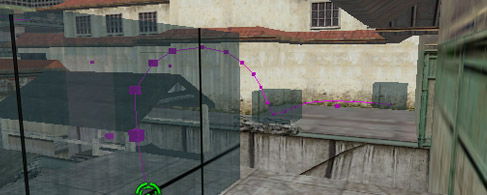
To add a stride, use the entity tool to place the Perfect Stride prefab simple_stride. Start by ungrouping it and moving the triggers to the most important parts of the stride. Now take a really deep breath and start dragging the points of the line through where you want the stride to appear.
The essential entities are set up to have 5 perfect strides per level, but you can change that later.
PERFECT TOUCHES
You should have a level with geometry, orbs, strides, and essential entities. Now you need to tell the logic how many orbs you have, and at what intervals the strides should appear.
To find the number of orbs, count how many orb_spawns you have with map > entity report. Now find the math_counters called orb_counter1 through 5 and orb_counter_end. Put the total orbs into orb_counter_end as the maximum legal value. Now divide that number by 5 or however you want to do it, and put the increments as the values for the orb_counter1 through 5. Tweak these numbers as you see fit. You can use the prefab's numbers as a guide.
Now the final touch to make the introduction work is to add the cameras around the map. With the entity tool add the prefab cameras to your map. Ungroup them and place the cameras and their targets around the level. They are labled 1-4 and are played in that order during the introduction.
That's all!

PERFECT VARIATIONS
You can put in however many orbs you want, just be sure to update the math_counters.
For no strides, use the essential_ents_nostrides prefab. For no intro sequence, use essential_ents_nointro. And for the minimalist, there is essential_ents_nostrides_nointro.
PERFECT DISTRIBUTION
When you are ready to release your map, you are encouraged to use the Perfect Stride Moddb Page. Go to downloads, and find the + for 'upload files' add your map to the page! This is moderated.
EXTRAS:
If you set up hammer correctly, you are encouraged to use the custom "retro" textures that come with the mod. Also, feel free to make your own (pick color, render clouds, pixelate, export)


interesting stuff, havent touched hammer in years :)
I am working on a map, I hope to post it in the coming weeks. A little busy with work.
Textures aren't showing up in 3d view or current texture box. :(
Nevermind. I had my VMF directory in a folder with a space in it. :)
Is there an easy way to find your custom textures?
I'm still looking for a way to get the textures, did you find it?
Nice tutorial. The prefabs seem easy to use, the power of Hammer is often underestimated, no FGD required.
Well I can make maps but hammer is ignoring my setup and saving BSPs in episodic instead of ps. $SteamDir\SteamApps\SourceMods\ps\maps = saving bsp in perfect stride's maps folder right? It also opens Ep1 if I check run after compile.
I can still play the map I just have to cut and paste it from episodic/maps.
It's because I'm using SDK isn't it? If I open Hammer without SDK it will only let me configure it for half-life. So only half-life and .wad and stuff.
I got it now. Sorry. All of my problems have been really stupid and were caused by me not thinking clearly.
Sorry for spam.
PS: I have no entities now..
Woah. You can pm me if you're still having problems
Ya know, I just figured out how to do this in CSS, and it's pretty fun on skateboard maps...
I found a bug in the prefabs, in the cameras.
Camera #2 and #3 don't have that 0.01 delay so they don't work.
The activate need to be changed from 2.50 to 2.51 and from 5.00 to 5.01
edit: also the default times are not in sync with the music
the two freeze and unfreeze relays have for output disable "orb" but there is no such entity as "orb"? missnamed?
good catch on the camera timing, I'll try to re-upload that fix soon.
the freeze and unfreeze have that output set to orb*, * is the wildcard that routes this output to any entity whose name starts with orb. It's kind of messy because not every one of those orb entities has a 'disable' input, but its more of a catchall just to make sure all the orb entities will be disabled.