I really do love me some Diablo 2, so much so 2-3 times a year I'll do a massive co-op runs with my mates, and have done so ever since its release. The problem is the game is old, and my pc is well... new. Because of our humanly ways to keep making advancements in the field of computing its getting quite difficult to come back to a game who's highest resolution is 800x600. As that size be tiny yo.
Thanks to the talented skills of a modder who goes by the name Sluggy you can now play Diablo 2 in any resolution that your pc can support! This is great news as no longer will my mouse slip out of the small window and open flash, no longer will my spells refuse to cast as I accidentally click my desktop instead! Finally. It comes at a cost though as you will not be able to participate in any Battle.net multiplayer stuff which is a shame I guess but in my opinion Diablo 2 is much better with close friends at a lan hyped up on coke (the drink you fools).
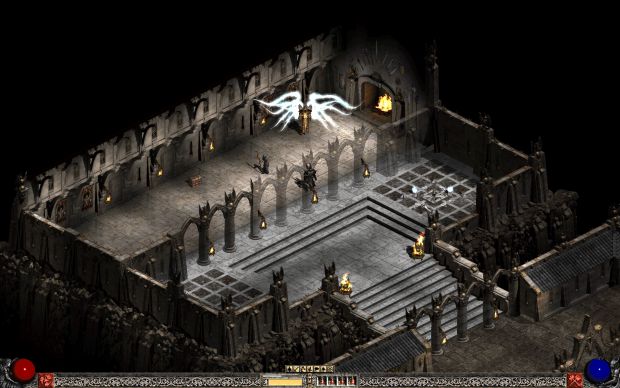
Mod_Author wrote: This unofficial "patch" allows you to play Diablo II in resolutions other than 640x480 and 800x600. It is, for the most part, completed, but there are still a few issues that have not been worked out. The "patch" lets you select any resolution 640x480 or higher that is supported by your current display adapter/monitor. There are no other changes to the game other than this.
Anyways you can download the mod from your favourite modding website ever, in the mean time enjoy the awesomeness that is these fantastic screens.
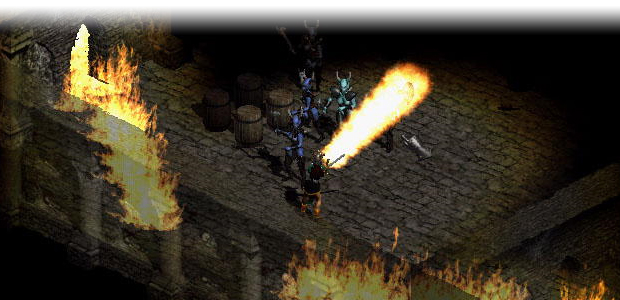



nifty
Wow, totally what it needed!
I guess I'll be playing in window mode now...
What about widescreen? No stretching or anything like that?
Its not stretching (im useing 1440x900 16:10), i have this now for a long time, so this tools was a life saver for me ^^
Heres some shots i made:
Screenshot.xfire.com
Screenshot.xfire.com
Screenshot.xfire.com (Resolution menu)
Screenshot.xfire.com
Screenshot.xfire.com
Screenshot.xfire.com (Quest log)
hi everyone.
Badtrane, can you explain to us, how do u have this resolution menu?
did you install d2multires or anything?
can you explain what did u do for playing diablo 2 in 1440*900 or other resolutions? step by step please. with download links if you download sth.
and can we play diablo 2 : lord of destr. with these resolutions?
Extirpation explains sth; i tried which he says however it doesnt work :( i need your help. i wanna play diablo with big resolutions. thanks. i waiting your helps...
have a nice play.
is anyone else having problems with it running?
No seriously WTF is this?
Why is one of my charecters gone...
why are my save files not working...
why am I not seeing any options for resolution changes...
why is my computer spouting more errors than a 1st term java app...
and why is Diablo now saying that its having "Unhandeled suggestions" and "access violations"
And Now why is my virus scanner going ape **** crazy!!! and Avast has not led me astry in the past.
I swear if I wasent so kinda-hearted and innocent, Id be getting mighty suspicious right about now...
Oh it works, just make sure you read the readme file.
I did, even removed all my changes and redid it step by step.
I'm beginning to think i should try to remove all mods and changes Ive already made to the game(I don't remember putting any on after the last time i installed it, but its possible I forgot), and then ill reinstall. It doesn't say anything about it not working well with other mods, but maybe its something obscure.
All right, for future reference. This game is not for diablo 2, but for its expansion. Yes its a bit deceiving that it doesn't make a huge deal about it not actually being for the game its listed under.
So If you don't have LOD you cant use it without a bit of tampering.
However its not guaranteed that you can use it even if you have the LOD expansion. I couldn't, so I searched around on a few forms and found this posted by some guy named Orfax that explains how to get it running even if you don't have lod, or lod isn't working.
This involves changing your registry, so if you feel uncomfortable in doing that, or you don't know what that is, then don't do it.
---------
Firstly run the D2MultiResGame exe that comes with the patch. It should start the game and generate a log file. You can't change the res in-game in a non-LoD Diablo II install because there is no resolution button, so exit the game. Look in the D2MultiResLog.txt log file (in your Diablo II folder). It should have a bunch of resolutions it found. Something like this...
Added Display Mode: 10: 640 x 480
Added Display Mode: 11: 1280 x 800
Added Display Mode: 12: 1280 x 960
Added Display Mode: 13: 1280 x 1024
Added Display Mode: 14: 1680 x 1050
Added Display Mode: 15: 1920 x 1080
See the number after "Mode:". Remember the number for the resolution you want to run it in. For me I wanted to run it 1920x1080, so 15 was my number.
Run regedit, search for "D2RMRes". Its parent folder should be "Diablo II". Change its value to that number you remembered. The number is a decimal number. Close regedit, and rerun the D2MultiResGame exe. Once you get into the game itself, you should have your nice new resolution.
---------
This guys suggestion worked for me, and the results are impressive.
Still dont know why Avast didnt like the patch that first time though.
Nevermind.
-FACEPALM- Why do you NOT have LoD?
What if I don't have "D2RMRes" in the registry?
This comment is currently awaiting admin approval, join now to view.
This is old, i had this like year ago...
Does this work with Pluggy?
yes of course pluggy offers to set up which dlls to load search in medianxl forum if you want details
Can i use this on bnet? Or I get banned for it?
Well I did say in the news post...
Oh, sry my bad, i didn't read the whole.
It has a seperate .exe so I guess bnet wont work.
can you play LAN with this? I hope so cause I today's MMORPG's suck! except WoW and the WC3 RPG Maps!
please send me a PM with answer ause I won't be back on the internet for a while and I will forget to come back!
Awesome patch!I hope Blizzard add higher resolutions officialy in patch 1.13.
"Thanks to the talented skills of a modder whose name I am having trouble finding (sorry pal)"
According to the release announcement on Phrozenkeep (http://phrozenkeep.planetdiablo.gamespy.com/forum/viewtopic.php?t=51560), the author is Sluggy.
(I'd've made that a link, but idk how yet, nor can I quote-and-edit badtrane's comment to see how it's done.)
Thanks, I've edited the post to show this.
"in my opinion Diablo 2 is much better with close friends at a lan"
and thats why there will be no LAN in D3
Jay Wilson:"We have no intent to support LAN games"
Awwwwwww ********
v LAN is never outdated. Unless you don't have friends.
Which is exactly why I tell everyone it's outdated lol.
Which assumes you're having no friends, who are you telling then?
(buried)
LAN is outdated anyways, with high speed internet connections being as cheap as 20$ today, not many people use them anyways.
This almost makes me want to install D2 again, but lack of B.Net support is kinda iffy...SP isn't that fun(Well, I beat SP like 100 times, so yeh. )
your comment is as wrong in 2015 as it was in 2009
Savage
This comment is currently awaiting admin approval, join now to view.
I am gonna try it out!
Do I need to own a license of the original Diablo2 for this to work? Will this game work with Hamachi?
1) no 2) yes
Interesting, Ill try this !
this doesn't work with Sven's OpenGL-Glide wrapper :(. I get low fps on d2 when i use this with DirectDraw. would be nice to support the wrapper.
Since I'm the person that took those pictures, I would like to say a few things about this mod since I've used for a while and know several details that may be important to some.
1. If you use a ATI card, make sure you disable Catalyst AI
2. If you are running a very high resolution, make sure you turn off perspective otherwise you get glitches.
3. This mod requires the latest version of Diablo 2 to run.
4. This mod not only works on Vista and Windows 7, it actually runs faster. I speculate this is due to Superfetch. I'm not really sure but there is no denying it runs better on Vista/7 during heavy fighting.
5. This mod will run faster in software mode, but Directx render looks 10 times better.
6. When going to a new area or town, the game must preload some files, but after a few seconds the game SHOULD return to normal speed. The higher the resolution you run, the longer it takes.
so no OpenGL support :(. OpenGL looks better and runs faster than DirectX.
Not on NVIDIA cards.
...not on AMD ATI cards.
NVIDIA is actually good at openGL.
I updated to the 1.13c patch (I have D2 and LOD) and I get this when I try to run D2MultiResGame.exe - "ERROR: Unable to load D2MultiRes.dll. Exiting Diablo 2." Funny thing is the dll is in the folder along with the other three files, just like the readme instructed. Anyone else get this problem/know of a workaround?
Newer patches are not supported. This interacts with the binary code and DLL locations in memory. Any patches to Diablo II are likely to break it.
Anyone know if there are plans to support 1.13+?
No. The author has abandoned the project years ago.
this crappy thing is wrecking my nerves!!!!!!!!!! i've tried and tried and tried for Days!! i just cant change the damned resolution even after all the things i've tried on the net... could someone please help me T_T
To every one that have problems running the multires patch. Please MAKE sure you have a clean install and diablo 2 patch v1.12a. Multires patch DOES NOT work with patch v1.13c. Also, for best results run with DirectDraw and it will fix all your wierd graphics glitches. If you run it with Direct3d expect wierd pixel/graphics glitches. When running DirectDraw it will take the game 2 to 4 minutes to load. That is normal!!
If you have glitches with directdraw and using windows vista/7 due to windows aero effects etc..
Rename game.exe to game.bc then rename D2MultiResGame.exe to game.exe make a batch file with the following:
rundll32.exe dwmApi #104
taskkill -f -im explorer.exe
start "game" "C:\Program Files (x86)\Diablo II\game.exe"
pause
rundll32.exe dwmApi #102
explorer.exe
exit
When you are done playing the game just click any key on keyboard to replace explorer.exe
Is also possible to use this patch with PlugY
PlugY can be found here:
Plugy.free.fr
If you are going to use plygy make sure you edit line in the batch file to this:
"C:\Program Files (x86)\Diablo II\Mod PlugY\PlugY.exe"
That should do the trick.
My set up.
Intel quadcore 2.5 ghz
6 gig of ram ddr3
Windows 7 Ultimate edition
Nvidia GTX 470
36" Monitor @ 1920x1080 HDMI output
IT'S NOT WORKING ANYMORE I MEAN WEBSITE
so i'm pretty sure i have the most mysterious and uncommon error. i've seen only one post mentioning it across several forums and no responses.
simply everything worked fine after downloading the C++ package and downgrading to 1.12a, except for the fact that there is nothing new in video options when executing multires. even the text log multires creates saying "Added Display Mode: 10: 640 x 480" etc. was added in my diablo II folder. any ideas?
So, I see that many people have xfire detecting Diablo II even with this mod installed. Can anyone explain how they did it please and thank you.