Since the beginning of time, the forces of Order and Chaos have been engaged in an eternal struggle to decide the fate of all Creation. That struggle has now come to the Mortal Realm... and neither Man, Demon, nor Angel will be left unscathed.
Description
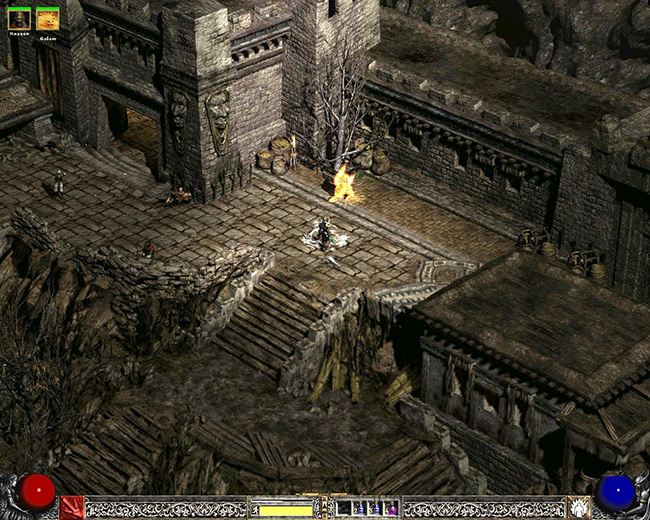
This unofficial "patch" allows you to play Diablo II in resolutions other than 640x480 and 800x600. It is, for the most part, completed, but there are still a few issues that have not been worked out. The "patch" lets you select any resolution 640x480 or higher that is supported by your current display adapter/monitor. There are no other changes to the game other than this.
Preview
Post a comment
Profile
Icon

Developer & Publisher
Blizzard EntertainmentEngine
CustomContact
Send MessageHomepage
Sea.blizzard.comRelease date
Game watch
Follow
Related Games
Diablo II
Hack 'n' Slash
Diablo II: Lord of Destruction
Hack 'n' Slash
Related Groups

Blizzard Entertainment
Developer & Publisher
Tags
Filefront just don't works for me D:
Please, reupload it somewhere...
I wanna play it badly...
Yeah, same here. This is actually the best timing imaginable, because not a week ago I decided to play through the game again, and quite frankly, my 24in 1920x1200 monitor is just an elaborate magnifying glass.
So please fix it...
well I got the download...but It doesn't seem to work...every time I try and run it in directdraw (like the read me says) it never starts, and when I booted it up in compatibility mode it gave me weird errors. So I said screw it, Ill deal with it tomorrow, and reverted everything back to normal and now I'm missing a character, and I'm a lot worse than I used to be...
Don't ask me how it happened, but now I'm level 6, and one of my characters is gone.
If if were to guess, I would say something went wrong when changing the compatibility mode, and it may be reading a previous save, or no save at all.
Or maybe it doesn't work with windows 7.
Had to modify the registry, but I got it to run.
Tell me what you did to get it working Extirpation
Unable to load d2multires.dll!! u.u its only 1.12 patch ? not work with 11.b ?
iam having same problem problem as innu using patch 1.11b
hmm just tryed checking if updating to 1.12 helped and it did indeed this mod is very nice i em using it with direct 3d (having problems with directdraw in all games that uses it) and i em having no issues other then small glitches you whant notice at all after a few min of play
it was about time something like this would be released. is it compatible with other mods ???
Got some visual artefacts with 1680x1050 but 1440x900 seems to work like charm.
Thank you for this awesome mod!
Img187.imageshack.us
can it be played online or does battle.net kill it?
No. Your key will get banned.
does it work with median and plugy?
playing it using median with no problems
but u cant use it with plugy right?
Actually you can, just rename D2MultiResGame.exe to Game.exe and run PlugY.
pal you are my hero!
Does this support widescreen resolutions?
yep
One more thing I forgot, If you are running Vista or Windows 7, make sure you run video test and select Direct 3d because Directdraw will not work.
To start the game you have to click on the D2MultiRes Icon and not the Diablo 2 icon.
I am running Vista and I ran the game in DirectDraw and Direct 3d. Both produced this problem: I3.photobucket.com
That blurr at the bottom comes in and out, and that tree spike will run across the screen. It's playable but not ideal..
Anyone have a fix?
Turn off perspective is you are running a high res, and it WILL fix the problem.
i was wonderin if the mod works on other mods ??
hmm it's great but direct3d lags in 1024x768 with perspective turned on. 3dfx glide works a lot better but the game crashes with a glide wrapper. sigh... looks like i'll have to stick with 800x600 for now
The game runs faster on Vista or Windows 7. Noticeably faster. I believe this is due to superfetch.
Obviously the game is going to crash with a glide wrapper since you need a 3dFX card to run glide, and they been out of business for nearly a decadse now.
Is it safe for me to play battle.net with this mod installed?
This isn't a mod. And the question has already been answered. It will ban you for "Using hacks".
Any one have a link for an un-infected download of this ? as the file D2MULTIRES.DLL in this one has the W32/Bongler-based!Maximus infection in it which scans wow accounts ect..
I've tried a few different antivirus scan and got nothing. I assume yours is a false positive.
Hye everybody,
I have the big problem with the dll message.
I tried to use this patch but without any luck because, all i have tried give the same error message : "Unable to load D2MultiRes.dll"
1) First, i re-install the game in this way : Diablo2/lod/patch 1.12/multires.
2) My second search was on a post but i cannot include the url because i haven't been registered for 7 days.
Anyway,I install the package C++ 2005 redistributable. Doesn't change anything
3) So, I install the 2008 C++ redistributable just in case there was some tools missing in versionning. Doesn't work.
4) I tried 2008 redistributable SP1. lol.
5) I'm using "filemon" to inspect the behavior of d2multires.exe.
It seems d2multireslog.txt is missing because d2multires.exe encounters a sort of "buffer overflow" when loaded.
At this time, i have empty all ressources in the net so if someone could help, i will be grateful.
My config :
Windows XP SP2
AMD64 X2 (+3800)
Winfast A400 tdh (geforce 6800)
4Gb memory
Matrox TripleHead2go with 3 LCD.
Diablo 2 and lod in version english.
Thank you.
(buried)
DO NOT USE THIS MOD
Thank you to whoever created this mod, my bnet CD key is now perma banned....
If you play online id advise you not to use this as you will get caught and banned.
This is clearly a hack. You can not use resolution hacks online because it gives you an unfair advantage compared to everyone else. You violated Bnet EULA. You deserved to be banned.
Kudos to the creator(s) for a great mod!
Is there a way to get this to run with PlugY?
It works fine on my computer, but I think it's because (for some reason) I don't have to use the PlugY executable to play D2 with the huge stash - I can just use the normal D2 executable. I'm not entirely sure what I did, as I installed PlugY normally, and then MultiRes normally.
Anyway, a quick response would be greatly appreciated, as my friend and I want to play with both PlugY and MultiRes enabled.
Thanks.
On a side note, however:
@uzisniper
There are warnings all over the internet not to use this mod on bnet, and it's just common sense NOT to use a mod on bnet at all.
You should be thanking yourself for your lack of said sense, not the mod creator.
Rename the Multires to "game.exe" and try it with PlugY and let me know.
Anyone know if this thing works with versions 1.10 and 1.11d?
PS: for the record, you can use this mod in conjunction with any other mod that uses a data folder (add "-direct -txt", without the quote marks, to a shortcut to the exe that starts the resolution mod) or replacing the patch_d2.mpq
Only 1.12, as it was made with the 1.12 executable.
does this mod get an update, so we can use it with glidewrapper?
It's a hacked 1.12 executable not a game mod, and no. No updates are going to be made unless some random person want to create an entirely new hack with the newest executable.
Was working great until the 1.13 patch update came in a few days ago. Anybody know anything about an update ?
Only works with 1.12 with no plan for updates.
I'm keep getting this: "ERROR: cannot load D2MultiRes.dll. Exiting Diablo 2..." I used bnet to patch D2LOD to 1.13c. Is this error because of the new D2 patch? or Windows 7? I run the game in compatibility mode(XPSP2) and as admin, in a window... and my colors are fubar.
Does anyone encounter the same issue? Any new versions of this mod? Any fixes?
It only works and will only work for 1.12.
BOOO!
I'm receiving an unhandled exception error. Something about permissions (I'm at work and not at my home computer). However it has full permissions and is bring run as administrator. Tried running in direct3d and direct draw. I'm on Windows 7 (Has anyone got it to work on 7?). I'm using version 1.12.
I am also Getting this same issue, I used to have 1.13d and that did not work, so I went to 1.13c and still did not work, I went to 1.12a and now I get that "UNHANDLED EXCEPTION: ACCESS_VIOLATION (c0000005)" error and closes D2 when I hit OK.
I've followed the instructions but every time I try to open the exe I get "Unable to open d2multires.dll". I'm using 1.13c of Diablo and 1.02 of this mod.
Unless the problem is not running in windows mode however I'm unsure how to do this.
Works for 1.12 only.
Then its just TRASH... useless....
You can only use it for single player anyway so why can't you install an older version of the game?Moron.
Hi everyone!
the mod "works" for me, I mean I can start the game, but there is no option to change the resolution. does anybody know why?
I had updated the game previously to 1.12a version. I copied everything that needed to be copied... what might be the problem?
another question: does this work with LoD? or is there another multires mod that does?
Go to option, then video, then resolution. Screen will flash then you should be able to select any resolution supported. Yes, it works with LoD.