Mechcommander OmniTech is a standalone game based on Mechcommander 2 shared source code release by Microsoft. A game based in the universe of a great and fun franchise, a game with lots of tactical components and full of possibilities. There is no need for Mechcommander 2 installation nor disk.
Description
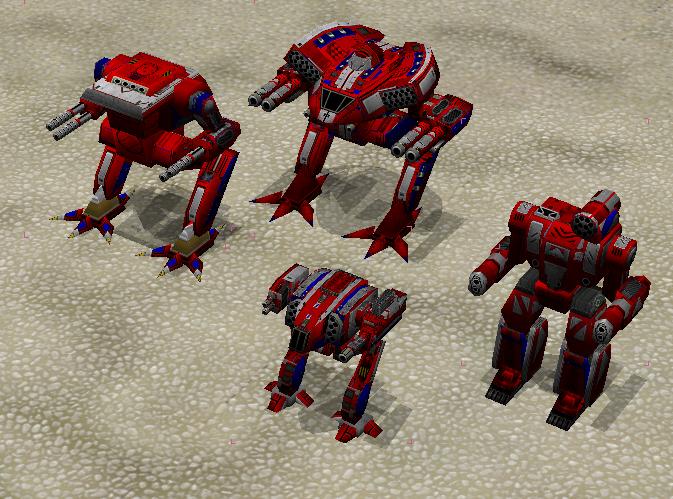
MCO version 276. Bug in component purchase screen fixed. New mech model and texture for Shadowcat.
Preview
Post a comment
Profile
Icon

Game
MechCommander 2Creator
magicXContact
Send MessageHomepage
Hard-light.netRelease date
Mod watch
Follow
Related Mods
Related Games
MechCommander 2
Real Time Strategy
Tags
I get the same crash over and over
" invalid pointer passed to gos_Free (0x1) "
what is that? how do I solve this problem
when this happens, when you start the game, what screen?
yes when i try to start the mission, the game crashes, or sometimes i can play 2 or 3 minutes but then crushes again
I played through first 4 missions of the exodus campaign last night without problems. I never had an error like that from the start of my work on MCO.
What is your operating system, your desktop resolution?
Do you run any other programs in the background? MCO works fine with winamp running in the background, but has issues with some other programs, like internet browsers...
Thanks for this update, the game is much more stable now.
No crashes in the inventory anymore, thanks! I do however gain full access to clan mech purchasing in original single player campaign, bug? ;-)
When I load Omnitech 276 the main screen is half way off the monitor. I can see part of the menu icons to click on but it shows no verbiage on the icons. So I guessed my way through the menu and found the options selection and adjusted my graphic's. Unfortunately this did not help. I am running Windows 7 64bit, desktop resolution is 1920x1080.
This comment is currently awaiting admin approval, join now to view.
Hi everyone, i ve run into MC2 just recently and discovered a great game! Its awesome even in vanilla version, BUT: one feature makes me mad and sad - AI "aggro" system. Enemy chases first of our mechs spotted and ignores all others while they vaporize it to atoms without any risk. Single enemy 30-ton mech keeps fighting with full team of our mechs of total weight 320 tons instead of running away for its life and reinforcements. Is there any mod fixing that stupidity?
Try MCO. Enemies are "smarter", no more "Enemy chases first of our mechs spotted and ignores all others".
There is a proposal correct dimensions of the mechs. For example: Thor (Summoner) in size almost as Atlas, despite the fact that Atlas weighs 30 tons more. And so with the rest of the mechs, weigh little, and look great. There is no proportionality between the weight and dimensions.
I am sorry but that is not the case.
Put an Atlas and Summoner side by side and take a good look.