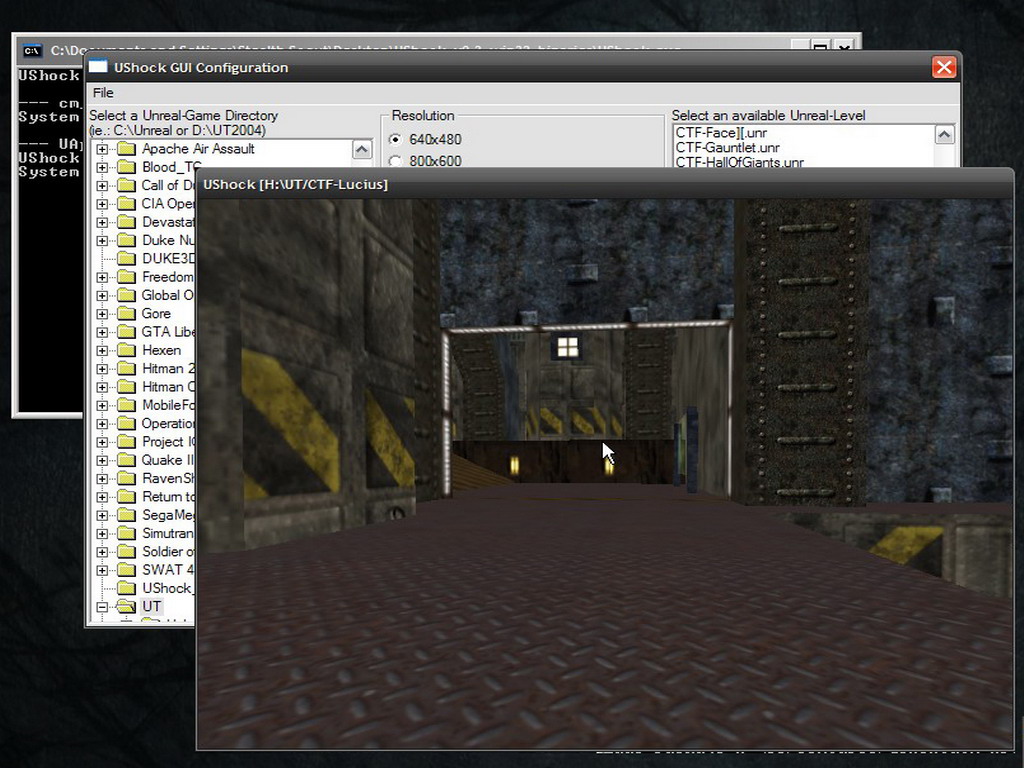
UShock is a experimtenal Unreal level viewer for all Unreal game series from Unreal1 to UT2004! (tested: Unreal1, UT99, WOT, Unreal2, UT2003, UT2004).UShock loads all the dependend packages (Textures, Static-Meshes etc.) and displays everything using a simple (more or less;-) OpenGL renderer.To view a level just select Unreal game directory (i.e.: C:\Unreal, C:\UT2004)and the desired level on the popup-GUI-Window and press "run".
(Installation:unpack the contents of the zip-file in a local directory.
IMPORTANT: UShock.exe and wxmsw24.dll have to reside in the same directory!)
README.txt updated 16.07.2005 by Diablo
mail: diablo_proxy 'at' gmx 'dot' net
project summary page: Sourceforge.net
project home page: Ushock.sourceforge.net
"Make Something Unreal" contest: Unrealtournament.com
UShock is a experimtenal Unreal level viewer for all Unreal game
series from Unreal1 to UT2004! (tested: Unreal1, UT99, WOT, Unreal2, UT2003, UT2004)
UShock loads all the dependend packages (Textures, Static-Meshes etc.)
and displays everything using a simple (more or less;-) OpenGL renderer.
To view a level just select Unreal game directory (i.e.: C:\Unreal, C:\UT2004)
and the desired level on the popup-GUI-Window and press "run".
Installation:
-------------------
* unpack the contents of the zip-file in a local directory
IMPORTANT: UShock.exe and wxmsw24.dll have to reside in the same directory!
Requirements:
-------------------
* desired Unreal game content (of course)
* full OpenGL support (at least 1.3.0)
-> required extensions: ARB/EXT_multitexture, ARB/EXT_texture_compression[_s3tc], ARB/EXT_texture_env_combine
-> recommended extensions: ARB_vertex_buffer_object
(up to date drivers might help)
* graphics hardware: tested on GeForce2TGS and moblity Radeon 9700 (m11)
-> should run on all mainstream cards
Hint:
-------------------
If your desktop color-depth is set to 32 bit and
you try to start UShock with 16 bit fullscreen mode,
the thing is likely to crash (in this case no correct
gl-driver will be loaded)
Controls:
-------------------
W - forward
S - back
A - left
D - right
F1 - center camera
m - change rendering mode (normal, flat, wireframe, lightmaps only, nolightmaps)
Esc - quit program
Build-Hints:
-------------------
You'll need wxWidgets library (at least 2.4xx) and under Linux the SDL lib.
check out the Makefile first if you want to compile it under Linux - you need an 'old' g++ version for wx-dependend builds
If you are using VisualSTudio .Net there will be some stupid memory error on release-build (debug works)
Verison history:
-------------------
version 0.3:
* .uz2 package support (packages will be uncompressed on the fly)
* hack to load levels from the ut2004 dvd (choose x:\CD1 as Unreal-root directory - very slow because of many 'fseek' calls)
version 0.2:
* lightmap support for ut2003/4 (DXTn Lightmaps only)
* "Wheel of Time" support (ArVer 68 -> UT1 Tech)
* possibility to switch between different rendering modes (m-key)
* support for new 'Material' classes like texpanners, texrotators etc
(just have a look at AS-Convoy ;-)
* rendering fixes for 'Shader' class (well its very tricky to imeplement Unreal shading system correctly...)
* better Unreal1-Tech blending support (including PF_AutoUVPan)
* group-namespaces fixed (package.group.object)
version 0.1
* package support for Unreal1, UT1, Unreal2, UT2003/4 (ArVer 60-127)
* simple terrain rendering added
* GUI config added
LICENCE:
-------------------
COPYRIGHT 2005, Bertram Thomass
This file is part of UShock. UShock is free software; you can redistribute it and/or modify it under the terms of the GNU General Public License as published by the Free Software Foundation; either version 2 of the License, or (at your option) any later version. UShock is distributed in the hope that it will be useful, but WITHOUT ANY WARRANTY; without even the implied warranty of MERCHANTABILITY or FITNESS FOR A PARTICULAR PURPOSE. See the GNU General Public License for more details. You should have received a copy of the GNU General Public License along with Nexuiz; if not, write to the Free Software Foundation, Inc., 59 Temple Place, Suite 330, Boston, MA 02111-1307 USA
-> see gpl.txt or Gnu.org
This Program uses public-Header Information available at Unreal.epicgames.com





UShock v0.3 (Built: Jul 31 2005 17:25:29)
--- cm_system_win32::cm_system_win32 ---
System Initialisierung.
--- UApp::UApp ---
UShock Initialisierung
System: x86/Win32 system
--- cm_context_gl_win32::cm_context_gl_win32 ---
WGL Initialisierung.
lade Graphik-Library OpenGL32.dll
Pixelformat: 640x480 pixel(16) depth(24) stencil(8)
***********************************************
*** Checkoint Failed! [ Expeption-Handler ] ***
Errmsg: Callstack: UOpenGLRenderDevice::UOpenGLRenderDevice <- UApp::UApp <- main
Datei:
Zeile: -1
Sie koennen einen Bug-Report an diablo_proxy@gmx.net schicken!
Das Programm wird beendet.
***********************************************
Hmm .. It always works great for me ... That error message is about issues when running in a windowed mode.Try running it in full screen.
Also,always use same color depth as you use in desktop.
Hehe, seems I detected my BloodTC at this screenshot :)))
Are you autor of Ushock?