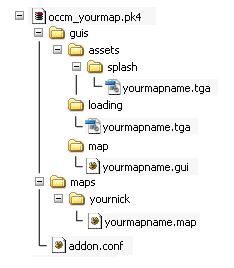
For custommaps we prefere to build addon pk4s.
So every
map can have its own entity-, definition- or weaponscirpt modifications.
Complete the following steps to have a simple to start and well
contained map.
- Loading GUI with progressbar and custom
text:
For background pictures, save a 512x512pixel tga file to"guisloadingyourmapname.tga"
When taking the screenshot, hide
weaponmodel and hud to get a clean shot .
Save your GUI in
"guismapyourmapname.gui"windowDef Desktop
{menugui 1
nocursor 1
rect 0,0,640,480
windowDef BackgroundImage
{
rect 0,0,640,480
visible 1
background "guis/loading/tut1" //place
here your backgroundimage
matcolor 1,1,1,1
}
windowDef Scanlines2 {rect 0,0,640,480
matcolor 0.02,0.02,0.02,1
background
"gui/test/gui_scanlines4"
matscaley 3.75
noevents 1
visible 1
}windowDef bgBlackTop {
rect 0,0,640,200
visible 1
windowDef
bgBlackTop1 {
rect 0,-21,170,-64
background "guis/assets/mainmenu/bg1"matcolor 1 ,1 ,1 ,0.6
visible 1
noevents 1
}
windowDef
bgBlackTop2 {
rect 170,-21,32,-64
background "guis/assets/mainmenu/bg2"matcolor 1 ,1 ,1 ,0.6
visible 1
noevents 1
}
windowDef
bgBlackTop3 {
rect 202,-21,458,-64
background "guis/assets/mainmenu/bg3"matcolor 1 ,1 ,1 ,0.6
visible 1
noevents 1
}
}
windowDef
bgBlackBottom {
rect 0,342,640,187
noevents 1
visible 1windowDef bgBlackBottomFill {
rect 0,64,640,75
backcolor 0 ,0 ,0
,0.6
visible 1
noevents 1
}
windowDef bgBlackBottom1 {
rect
0,0,347,64
background "guis/assets/mainmenu/bg1"
matcolor 1 ,1 ,1 ,0.6visible 1
noevents 1
}
windowDef bgBlackBottom2 {
rect
347,0,32,64
background "guis/assets/mainmenu/bg2"
matcolor 1 ,1 ,1 ,0.6visible 1
noevents 1
}windowDef bgBlackBottom3 {
rect
379,0,261,64
background "guis/assets/mainmenu/bg3"
matcolor 1 ,1 ,1 ,0.6visible 1
noevents 1
}
windowDef bgBlackBottomFade
{rect 0,30,642,128
background "guis/assets/mainmenu/bg4"
matcolor
0,0,0,1
visible 1
noevents 1
}
}
windowDef TitleBar {rect -300,391,512,19
visible 1
background "gui/loading/titlebar"matcolor 1,1,1,0.1
}
windowDef TextDescription {
rect
17,414,521,81
visible 1
noevents 1
forecolor 1,1,1,0
text
"Welcome to the OC Customs tutorials." //place here
your description text
textscale 0.25
font "fonts/an"
}windowDef LoadingFillClip { //this loadprogress
animation will only work if you set the mapsize in your addon.conf .rect 2,18,( "gui::map_loading" * 175 ),16
visible 1
windowDef
LoadingFill {
rect 0,0,256,16
visible 1
background
"guis/assets/splash/load"
matcolor 1,1,1,0.8
}
}
windowDef
LoadingLine {
rect 2,18,256,16
visible 1
background
"guis/assets/splash/loadborder"
matcolor 1,1,1,0
}
windowDef
TextLoading {
rect 16,-6,123,30
visible 1
text ""
font
"fonts/micro"
textscale 0.4
forecolor 0.2,0.6,0.7,1
}
windowDef
FlareBox{
rect 0,0,48,21
background "gui/mainmenu/textflare"matcolor 0.4 ,0.6, 0.6, 0
visible 1
}
windowDef TextTitle {rect 16,356,610,30
visible 1
text "Tutorial 1" //place here your mapname
font "fonts/micro"textscale 0.4
forecolor 1,1,1,0
}
windowDef TextSubTitle {rect 16,387,610,30
visible 1
text "Spawn Progression" //place here your description headline
textscale
0.4
forecolor 1,1,1,0
}
windowDef BlackFade {
rect 0,0,640,480backcolor 0, 0, 0, 1
visible 1
}
windowDef Anim {
//startanimation of this gui
rect 0,0,0,0
visible 1onTime 0 {
transition "BlackFade::backcolor" "0 0 0 1" "0 0 0 0" "400" ;
set
"TextLoading::text" "L" ;
transition "FlareBox::matcolor" "0.4 0.6 0.6 0"
"0.4 0.6 0.6 0.5" "200" ;transition "bgBlackTop1::rect" "0 -21 150 -64"
"0 -21 170 -64" "400" "0.2" "0.8" ;
transition "bgBlackTop2::rect" "150 -21
32 -64" "170 -21 32 -64" "400" "0.2" "0.8" ;
transition "bgBlackTop3::rect"
"182 -21 498 -64" "202 -21 458 -64" "400" "0.2" "0.8" ;
transition
"bgBlackBottom1::rect" "0 0 377 64" "0 0 347 64" "400" "0.2" "0.8" ;transition "bgBlackBottom2::rect" "377 0 32 64" "347 0 32 64" "400" "0.2"
"0.8" ;
transition "bgBlackBottom3::rect" "409 0 261 64" "379 0 261 64"
"400" "0.2" "0.8" ;
}onTime 50 {
set "TextLoading::text"
"#str_03469" ;
set "FlareBox::rect" "17 0 54 21" ;
}onTime 100
{
set "TextLoading::text" "#str_03470" ;
set "FlareBox::rect" "37 0 54
21" ;
}onTime 150 {
set "TextLoading::text" "#str_03343" ;set "FlareBox::rect" "57 0 54 21" ;
}
onTime 200 {
set
"TextLoading::text" "#str_03471" ;
set "FlareBox::rect" "67 0 54 21" ;transition "TitleBar::rect" "-300 391 512 19" "0 391 512 19" "400" "0.2"
"0.8" ;
transition "TextTitle::forecolor" "0 0 0 0" "1 1 1 0.9" "400" "0.2"
".8" ;
transition "TextSubTitle::forecolor" "0 0 0 0" "1 1 1 0.4" "400"
"0.2" ".8" ;
}onTime 250 {
set "TextLoading::text" "#str_03472"
;
set "FlareBox::rect" "81 0 54 21" ;
}onTime 300 {
set
"TextLoading::text" "#str_00408" ;
set "FlareBox::rect" "100 0 54 21" ;transition "FlareBox::matcolor" "0.4 0.6 0.6 0.5" "0 0 0 0" "200" ;
transition "TextLoading::forecolor" "1 1 1 1" "0.2 0.6 0.7 1" "200" ;
transition "LoadingLine::matcolor" "1 1 1 0" "1 1 1 0.8" "600" ;
transition "TextDescription::forecolor" "0 0 0 0" "1 1 1 1" "400" "0.2"
"0.8" ;
transition "TextDescription::rect" "10 414 517 80" "17 414 517 81"
"400" "0.2" "0.8" ;
}
}
} - Map Thumbnails:
are 256x256 pixel tga
files with the exact name of our map. Put that file to"guisassetssplashyourmapname.tga"
Simply resize your loading gui
background file - Getting map size calculated:
temporary save your mapdef in
"defyourmapname.def"Code:
mapDef yournick/yourmapname{
"name" "Name
listed in mapbrowser"
"devname" "shortname"
"oc_customs"
"1"
"size0" "0"
"size1" "0"
"size2"
"0"
"size3" "0"
}
to give doom3 access to
write in this file. Load the map once for eache of the 4 quality settings
(ultra, high, medium, low) with "com_updateLoadSize" set to 1. This will fill in
the size of your map and makes the loadgui progressbar working. - Pak your map:
simply use 7zip, winrar
or a ziptool of your choice.
Compress your files in a ZIP file and rename the fileextension to "pk4". - Addon pk4s:
are very simple to build.
Just put your mapdefinition in a file "addon.conf".Code:
addonDef {
}mapDef yournick/yourmapname{
"name" "Name listed in mapbrowser"
"devname"
"shortname"
"oc_customs" "1"
"size0" "1234"
//calculated in step above
"size1" "1234" //calculated in step
above
"size2" "1234" //calculated in step above
"size3" "1243" //calculated in step above
}
Paste the calculated size
and put this file on the first position in the pk4, next to the "map" folder.We no longer
need the first mapdef "defyourmapname.def" we created above, be shure to delete
it !
After all these steps, your addon.pk4
should look like this.