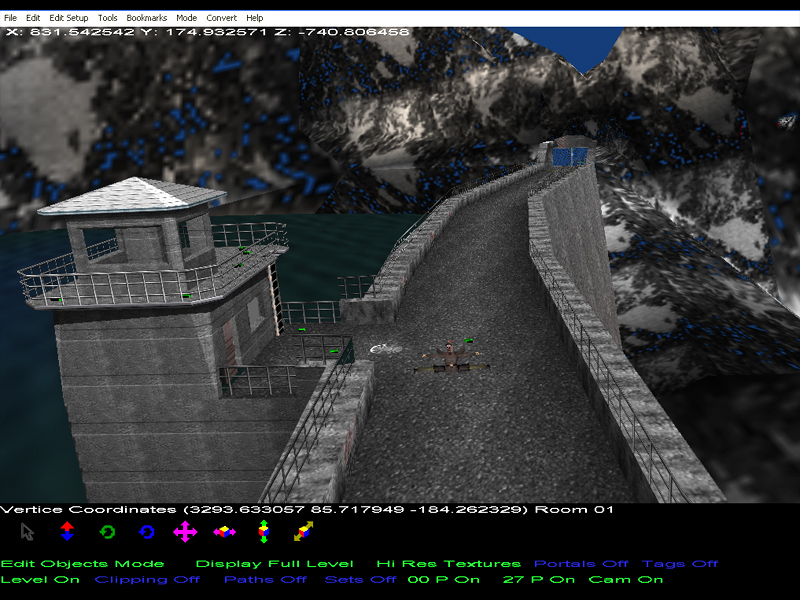
A comprehensive and exhaustive setup editor for Goldeneye 007 for N64.
by SubDrag, Zoinkity, and Wreck.
We now release the second version of our Goldeneye Setup Editor for Nintendo 64's Goldeneye.
System Requirements:
DirectX 9.0c or higher / Graphics Card with Updated Drivers for DirectX 9
Microsoft VS2008 Redist
Frequently Asked Questions (FAQ)
Use Perfect Dark ROM version 1.1 for all patching. 1.1 was chosen since it fixes several bugs in PD.
XDelta is a new, more efficient patch format supported by the GoldenEye Setup Editor. It is supported for both GE and PD. Previously IPS format was used by the editor, but it is limited to 0xFFFFFFF, which PD is larger than. To apply a patch, Tools -> XDelta Patching, then either Apply GE XDelta Patch or Apply PD XDelta patch. For IPS it remains Tools -> Apply IPS format, and only GE is supported. This is only supported in the GE Setup Editor 2.3 or higher.
You need the VS2008 x86 Redistributable package in order to run.
You must be running in administrator mode, otherwise the Visual Editor will not function. Also, make sure the correct DirectX and VS2008 x86 redistributable are installed (see other FAQ question).
First, DirectX 9.0c must be installed, whether on Vista or XP. Next, if that still doesn't do the trick, download the DLL directly and place it into the same directory as the GoldenEye Setup Editor, usually C:\Program Files\GEEdit2\.
In the main editor directory, the folder "Temp" must exist. Please create it if it is not already present. It is usually created with the editor, but if erased, needs to be recreated.
N64 games are ordinarily played from a cartridge. A ROM is the data contained on the cartridge stored on the PC in a file. These ROM files then can be played on emulators, backup devices, etc, or modified and then played. Ips patches are the patches that modify the ripped ROM, and can be applied using the Goldeneye Setup Editor.
This is an unfortunate problem in commanding the win32 console and a windows program. To fix it, go to Tools -> Preferences, choose the current folder to the main directory (C:\Program Files\GEEdit2\, by default), and then add your quick ROM and setup files you're working with to that directory. Also set your quick ROM to this quick ROM. It should fix this issue.
Unfortunately, most levels can't actually be played on console easily, since it requires modifications to the ROM. However, a few of the simpler levels may be played using a GameShark Pro 3.3, a 25-pin parallel port cable, and a parallel port on the PC. GameShark codes are required to be entered and turned on (available in the Help -> CodeList menu in the GoldenEye Setup Editor). Next, GoldenEye is started with the Code Generator on, and start the level of which the level replaces. The game should have a black screen and will stay that way. When a modification is downloaded from the Goldeneye Vault, there is usually a folder called individual inside the .zip file. If there is a file such as UsetuprunZ.bin, you should open this in the Setup Editor, then choose File -> Upload Solo. If all went well, your game will resume and your modification will be played. It's a tricky process, and unreliable. The best method on console is to use a device such as the Doctor V64 to play the actual modified ROM.
Older versions did not, but the most recent install will run on Microsoft Vista. If you installed an older version, remove the files d9.dll and d3dx9d_31.dll and it will work on Vista.
Most files on the site actually also have the individual files used to construct the level. They are located in the folder called "individual" in each zip file. The setup files can simply be opened, and the text/briefing files copied to the main directory to be used; however, all new levels suchas G5 Building or Car Park require opening the setup file, then importing the bg file and importing the clipping file in order to edit the level properly. Then apply the ips patch to a ROM, and Tools -> Convert ROM to edit one.
All of the patches on this site are zip files that contain in the main directory an ips patch, and usually a readme too. First, patch a Goldeneye ROM using the ips patching tool available in the Goldeneye Setup Editor. If you need help, use the Convert ROM Tutorial available in the tutorials. If your patch fails, you may need to byteflip, so follow the instructions on the other question here. Finally, if you can't figure out how to play the level, look inside the FAQ and it will tell you what level to load.
IPS patches do not contain information about byteflipping. There are two possibilities: Unflipped or byteflipped. For the record if unspecified, the patch is most likely unflipped. If the patch didn't work, it means your ROM is the opposite format of the patch. In the setup editor, choose Tools -> Trim/Flip ROM -> Byteflip ROM, then byteflip the ROM that isn't working. Apply the ips patch again to this new ROM, and now it should work.
Project64 is tailored to Goldeneye itself to improve performance. When a checksum is modified (which is often the case with the ips patches), it needs to have its settings modified. In the main menu of PJ64, right click on the ROM and choose Edit Settings.
Change to the following:
CPU Core Style: Recompiler
Self Modifying-Core Type: Change Memory and Cache
Counter Factor: 2
Check marks by: Large Compile Buffer, Register Caching, SP Hack, Use TLB.



im new to this and i reall would liek to make levels can someone please leme know how
hi
Check out shooters forever forums (link on goldeneyevault) for help
How you create a Goldeneye (N64) level?