
BSP-Level based game Engines
(mainly the id Tech 3 engine)
- The author can not grantee that the information provided in this tutorial is perfectly correct!
- The author assumes that the information in this tutorial is correct and the tutorial is written in a casual and non over-tech-termed manner.
- This tutorial does NOT teach you how to get started with mapping or how to modify a BSP!
- This tutorial is based on id Tech 3 engine with Ritual's ÜberTools 1.1, some technical specifications can be slightly different from the stock id Tech 3 engine.
A level which will be Compiled into a BSP is build with many different kinds of objects.
With this tutorial the author intends to introduce these objects to his audience.
This tutorial explains how the technology behind the mapping process works, and how the game engine knows what it has to calculate. The required background knowledge is included.
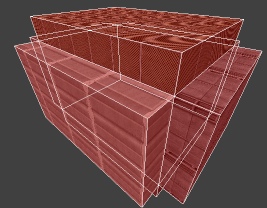 Is a Box! A box made of boxes makes a level, not a very pretty level, but in technical terms it is a perfect level.
Each one of these boxes have been created inside the Level-Editor, such a box is called a brush. A Brush can be deformed and reshaped in many ways. In this tutorial we assume that a brush is a square or cubic box, with exactly six surfaces.
To create a brush you need to press the left mouse button and hold it, while you move your mouse in any direction, to determinate the shape of your brush.
A Surface is a single side of an object, our object is a brush, which has because of its geometric shape exactly 6 sides.
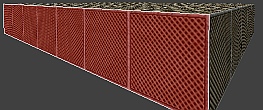 Each surface can only carry a single Texture, this means that our brushes can have up to six different textures; One on each surface.
If we have a brush with six textured surfaces, the game will draw all of these Textures, even those invisible to the player. For example, the outside of our „perfect level“, this makes six surfaces drawn per brush. The player can only see one surface of each brush, that makes 30 unnecessarily drawn surfaces.
The CAULK-Texture is an Image shown in the Level-Editor but not in game. During the compilation of the level into a BSP-File, the compiler marks all surfaces with the CAULK-Texture as invisible. You can load CAULK from the menu of the Level-Editor: Texture -> Common
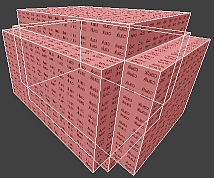 How the „perfect level“ looks from the outside. It is „caulked“, and will not be drawn in game.
A texture is an image imported into a game. The texture is a visual cover for a surface, like paint on a wall.
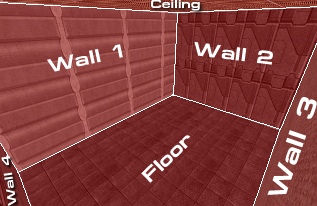
CAULK is also one of these special Textures, the additional Information is specified in a SHADER-File.
Textures are loaded into the RAM of the Player its Computer before entering the level, and are un-loaded when leaving the level or loading a new level. They are kept in the RAM when the level gets restarted or reloaded. (in-game console command: restart/map )
Continue on the next page with Chapter: ADDING DETAIL TO „THE PERFECT LEVEL“
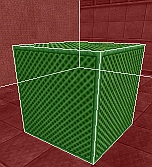 Our „perfect level“ looks a little bit empty, to keep this simple I will place a box in the center of the map.
I have now created a cubic brush and applied the same „texture“ on each of the five sides, the sixth side is facing the floor and can't be seen, and is suppose to be solid, so I applied CAULK on it!
The Picture on the top right of this chapter shows a „perfect detail“ inside a „perfect level“, but the box seems to be sick. Why else should it be highlighted green instead of red when selected?
Here is the answer why the box is green: The Editor highlights selected brushes in different colours when they have different functions. This box is drawn green because it is not a regular brush, this box is declared as „detail-brush“.
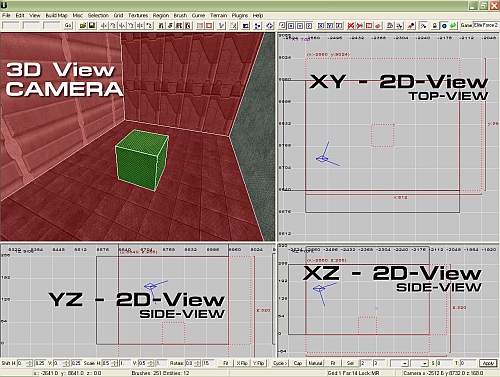
To declare a brush as „detailed-brush“, de-select all other brushes, press ESCAPE and select the brush you want to turn into detail.
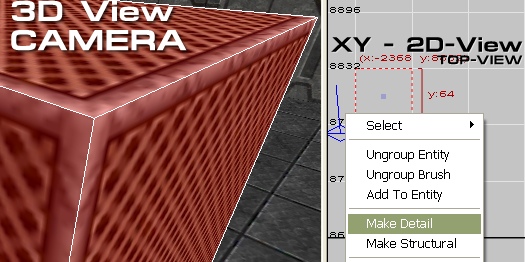
Alternatively you can use a keyboard short-cut, to make a brush to a level-detail. If you work with the ÜberRadiant you can press CONTROL, hold it and press then SHIFT, hold that too and finally press the key D.
If you have not broken your fingers with the key-combination CONTROL+SHIFT+D, you can release these keys now. The brush changed its highlight colour from red to green, which means that the brush changed its functionality. This brush is now a „detail-brush“, used only to decorate the level.
You will learn now why this brush had to be turned into a „detail-brush“, and what that means.
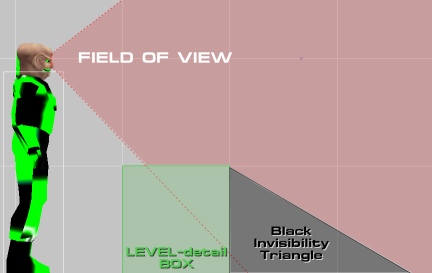
According to his Field of View (FOV) the ugly Ferengie is able to see the Box, and the most of what is behind the box.
The id Tech 3 engine can blend out parts of the level which are behind a „structural-Brush“, we go into detail later.
This blending-out and blending-in, requires a few additional calculations. These calculations will slow down the overall calculation process of the game, this means it will render less of the level over the same amount of time. Your Frames per Second (FPS) will drop for a short time.
In the Image shown above, it would be very un-wise to blend this „Black Invisibility Triangle“ area behind the box out. It would take a very little move in any direction for the player to change the the „Black Invisibility Triangle“ area. The box would produce a blend-in, blend-out minefield.
I have shown you just one box as example, but imagine a room with 100 or even more boxes. This would drop the FPS of every player moving along or near by these boxes.
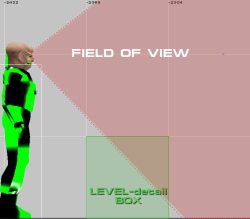 Once the box is a „detail-brush“, the FOV goes straight through the box.
The game will calculate and draw now all objects behind this box. If there is a small object behind the box, the textures of the box do completely overlay it and the player can't see the object behind the box anyway, but it is still calculated and drawn.
Using the ÜberRadiant, you can blend out all „detail-brushes“ of your map in the Editor-view at once, by using the key-combination CONTROL+D. Use CONTROL+D once again to show the „detail-brushes“ again. It is highly likely that your Level-Editor offers such a feature, perhaps with a different key-combination.
Level-Editors usually shows a fine grid in the 2D-Views, this grid represents a specific amount of units. Pressing the 0 (Num-Key) on the Keyboard, hides/shows this grid in the most Level-Editors.
To zoom in or out, left click once into one of the 2D-views and scroll with your middle mouse button.
The grid in the selected 2D-View will change and apply to the next higher or lower grid resolution.
Select the finest grid by pressing the Number 1 on your Keyboard, fully zoomed in this will show blocks of the size of 1*1*1 unit. If you now create a brush you will start with a block of 1³unit.
Units define the size of objects, as for example in Elite Force II, a player has the following set of units; When standing: Width 44, height 108, when crouching: Width 44, height 49.
The scale for the units, to build levels in STEF2 is different from other id Tech 3 based games. STEF2 uses a unique BSP-Tree specification, which means that the (compiled) levels are not compatible to other id Tech 3 based games.
Continue on the next page with Chapter: ENTITIES
An Entity is a dynamic single object, or a group of objects, accessible as individual unit on the level by the game-engine.
Static objects, like „structural-Brushes“, „detail-brushes“, patches, terrain, or as static flagged Models, will never move, they are grouped together to one big entity called world.
Every brush you create is static, it is automatically a part of the world. Unless you change its function in the Level-Editor. Models are not static and have to be made static in the entity menu, Using the ÜberRadiant you need to select the model, then press the key N and activate the check-box „Make Static“.
Entities can act independently from the static world!
Every entity on a map, like a Player, Bot, Item, Door, Trigger, Weapon, has to be constantly sent from the server to the player. All entities on the level as the player has it on his local Computer, will be synchronized with the informations given by the server, once the player his Computer has loaded the level, and player is about to join the game.
After the player has been successfully synchronized, the game will send only updates of the entities. All static objects which are a part of the world-entity are excluded from this synchronisation.
Example:
If a door opens, the server has to send a data package to the player including informations about this event, otherwise the player would not know that anything happened.
This update information sent to the client could look like this:
- The name of the Event
- Entity number
- Current entity coordinates vector
- Velocity
*10
'300 300 0'
'10 0 0'
Every level requires at last two entities!
- Entity 0 which is the level it self, called world.
The world entity will be created during the BSP-Level compile from all static objects. - Entity 1 which tells the game where the player has to spawn. This entity has to be placed by the mapper, and requires to be placed on the level ( info_player_start).
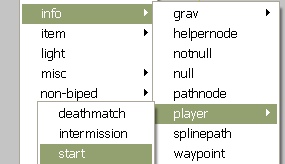 Click with the right Mouse Button into one of the 2D-Views and select from the appearing menu INFO>PLAYER>START and for Multi-player INFO>PLAYER>DEATH-MATCH.
As soon as a player enters the level, he will become the 3rd entity, with the entity number 2. If we give the player a weapon, the weapon will become the 4th entity with the entity number 3.
The player is firing one shot with his weapon, a projectile to-wards a wall.
The projectile explodes as it hits the wall and leaves a mark on it.
This event creates at last three new Entities, for a short time:
- Projectile(5th entity), will be removed as soon as it hits the wall.
- Impact mark(6th entity), which will be spawned as soon as the Projectile touches the wall.
- Explosion Model(5th entity), spawned as soon as the Projectile has been removed.
This event will increment the entity count on the server, from 4 entities to 6. The Projectile will be removed and become replaced with the impact explosion/effect model, so it does not increment the entity count. The Impact-mark is separate and will increment the entity count.
Continue on the next page with Chapter: „structural-Brushes“
I have been introducing you the „detail-Brush“ with my very little and cute box which has still to endure the creepy staring of this ugly Ferengie... However, I'm sure you remember that we had to turn this brush into a „detail-Brush“ our self, we used the key-combination control+shift+D.
Every „structural-Brush“ visible to you will be drawn at once, this means that even if you can see only a part of it, the game will calculate and draw the entire brush including all (textured) surfaces of it.
„structural-Brushes“ define the Level; How it shall be cut into clusters during BSP-compile. They define the cluster STRUCTURE of the level.
The id Tech 3 engine does not hide parts of the level as you look away from them. It uses pre-calculated data, written into the BSP-Level during the visual-compile, to decide what to show and what to hide.
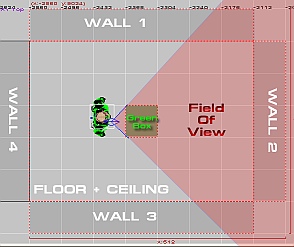 The Ferengie looks away from „WALL 4“, but the wall will be still drawn.
CLUSTERS VS „SHOW ON DEMAND“ (IN 1999)
Imagine that you move very fast inside a level in any direction, and the walls and objects pop-up out of nowhere, while you walk around a corner or whenever you enter a room.
This would be very confusing, and soon you would have to leave, because you would feel sick from all this popping.
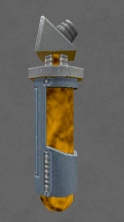 Because they care for your healthiness, the Developers of the id Tech3 engine decided to place health-items in their levels, shown here as Hypospray.
You may now think that computers are so fast that you won't notice any popping at all. Well for the computers of today (2009) and the future, you are maybe basically right. But the id Tech 3 Engine was released in 1999. Back in 1999 it was impossible for a single PC (on earth) to do all these calculations in real-time. Controlling the Artificial Intelligence (AI), calculating the movement of each Player, sending and receiving network data, drawing textures, playing sounds, plus receiving input from the Keyboard and the Mouse was already pretty much for a machine of that time.
To show and hide objects in real-time on demand with that massive amount of detail was simply impossible in 1999, so the developers decided to use a cluster based system. BSP-files offer them self for such a cluster based system.
In 2009, a cluster based system is still a pretty good choice, for multiple reasons. One of the most interesting reasons is for Multi-player. For example, when you walk very fast around a corner and you start lagging in this very moment, then it is highly likely that all objects around the corner are already calculated and drawn.
These objects will be shown immediately to you, even if the server has not yet verified your new location, which happens usually during lag. There is a also pretty good chance that you won't even notice the lag, if it is very short. Even today many players have a bad configured Wireless Network Connection producing lag.
Continue on the next page with Chapter: Compiling
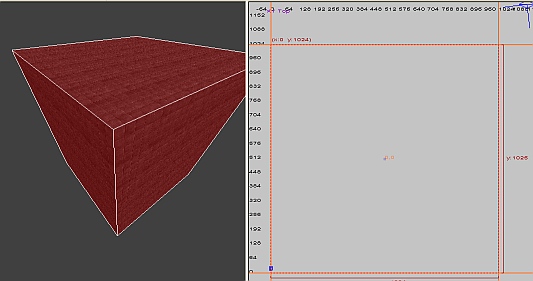
The shown brush shall represent a cluster in its shape and dimensions of 1024³ units
During the Visual-compile the level will be cut into clusters. A cluster has usually the maximum size of 1024 units ³. This means it is a cubic box with 1024 unites at each axis (1024*1024*1024).
Let us start simple, we will have the cluster become cut into two clusters. There is only one way how we can do this, and I will show you how to do that. This is so exciting, isn't it ? 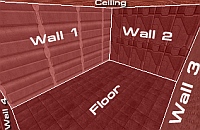
Now we are building a second „perfect room“, again with 4 Walls, a floor and the ceiling, we also need to place any Entity inside this room, the compiler requires this! I will place a mini Holodeck inside this room. I always wanted my own Holodeck :D .
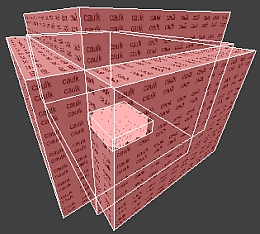
For the records, we do have now two separate, hermetic sealed rooms. These are in no way physically connected!
Take a brake and continue on the next page...!
- A Cluster can not be bigger than 1024³ units, unless it is inside the void
- „structural-Brushes“ are used to define the cluster-structure of a level
- View-Blocks cut clusters, Terrain and detailed Brushes into pieces to a maximum of 1024³ units
- „detailed-Brushes“, patches, terrain and models are only used to decorate the level
- Portals are used to optimize the level by cutting clusters and areas
- The static objects of a level are a put together as a one big entity, called world
- The id Tech 3 rendering Engine works with clusters and areas
- Every level contains at last two entities
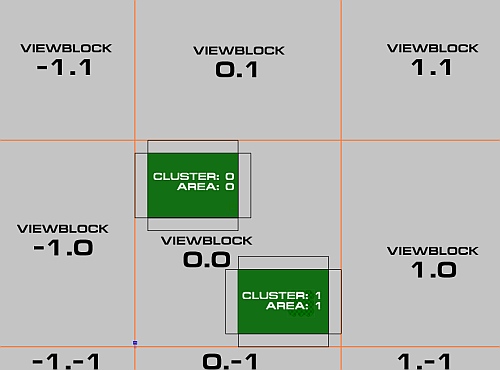
Clusters, Areas and Entities start with 0 instead of 1.
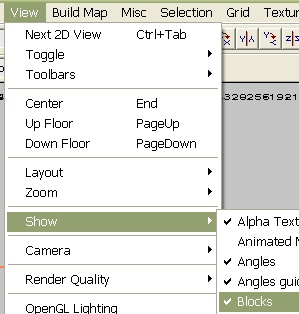
It's the job of the compiler to calculate, and define each cluster and area. We are now going to take a close look how this works.
A level can fill the maximum space of 16384 View-Blocks (at last in STEF2). I assume, that the compiler has to check every single block to see if there is a entity inside this block.
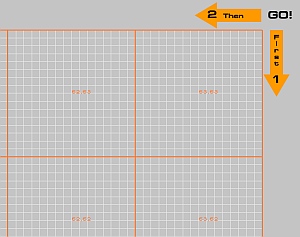
goes to 63.-64. Jumps to 62.63 and
goes from there to 63.-64 and continues
like this, until it reaches the end of the View-Blocks which is at -64.-64.
If the compiler finds a entity it will trace all „structural-Brushes“ surrounding, to define a room/area.
If the compiler finds a „structural-Brushes“ inside a View-Block it calculates how to cut the current View-Block, into clusters and areas...
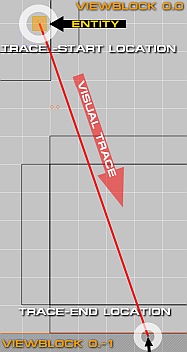 If the compiler is unable to calculate a „structural-Brush“ construct building a room fully compassing the entity, it will stop the visual-calculation and return a error message, telling the user that the Entity has „Leaked“. This means that the entity is outside the actual constructed world.
As we build a slightly more complex level, the level gets cut into more clusters. Depending on the level structure, the level can be cut into multiple areas.
VOID is a area outside the map, every thing inside the void will not be graphically calculated (rendered) by the player his Computer.
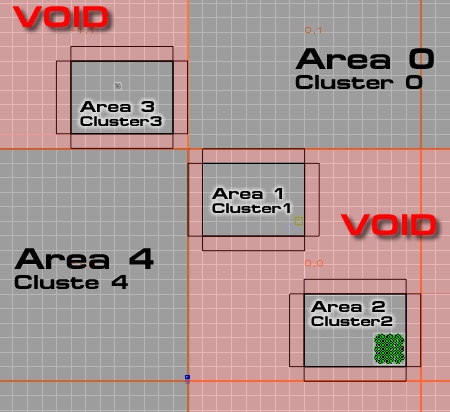
An Area is a region which has been defined to be one connected field of clusters. A single area can include multiple clusters, and always includes at last one cluster!
Clusters are shaped by the View-Blocks and „structural-Brushes“.
Unlike areas, clusters are limited to 1024³ units, as long as they are NOT inside the VOID! Clusters inside the VOID seam to fill the space between the View-Block they start in, to the edge of the level.
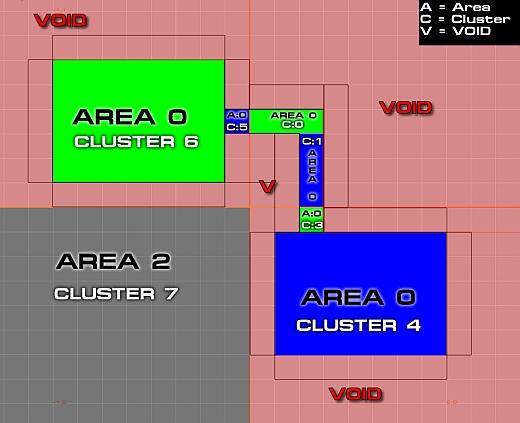
To find out how clusters and areas work we will now connect two of these three rooms together, to be precisely area 3 and area 1.
This changed the entire structure of the clusters and areas on the level! The room used to build area 2, which is shown in the image above is now area 1 and includes cluster number two.
The two connected rooms have now become a single area, they are now area ZERO.
Continue on the next page with Chapter: RENDERING
If there is no (physical) separation such as a portal, View-Block or a „structural-Brush“, the
BSP-compiler will mark all clusters visible, which are touching a cluster, including a entity.
Like a light in a room will fill the entire room with light if there is nothing in its way.
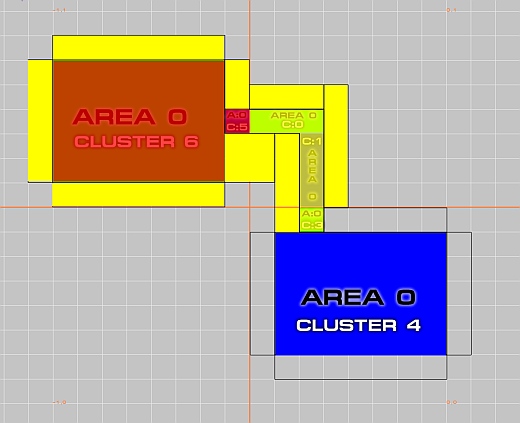
If the Player his camera is inside the the red highlighted clusters, the solid-yellow drawn brushes and transparent-yellow highlighted clusters shown in the image are rendered by the Player his Computer.
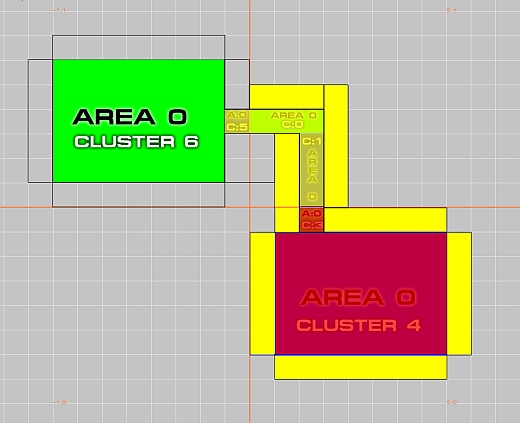
This level seams now to be a product of bad engineering...
But there is a way to get around issues like this.
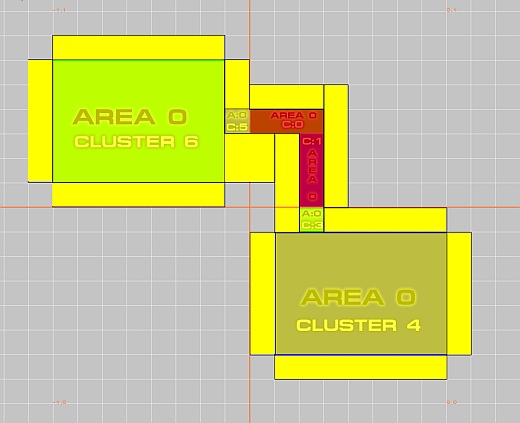
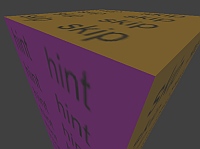 I will now create a new „structural-Brushes“, and I will apply two different kinds of textures on it. These textures have special predefined attributes!
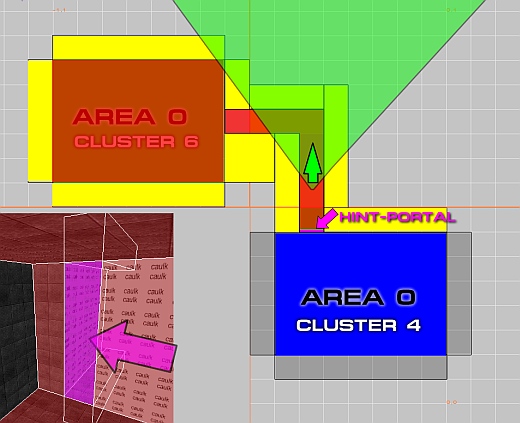
This brush has the exact width and height of the hallway, it will be used in. It fills the space now exactly, like a door would do.
if the Player his camera and field of view (green) is pointing away from this HINT-portal.
If the player his FOV faces at the same time both rooms, they will be both rendered !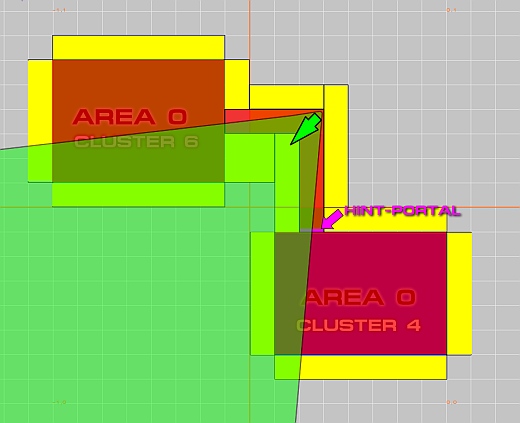
The HINT-Portal creates a new cluster at the location it has been inserted into the map, with the size of the portal brush. Only the surface textured with HINT will open/close the portal.
We are now going to work with a new level structure!
Continue on the next page when you are ready for a change.
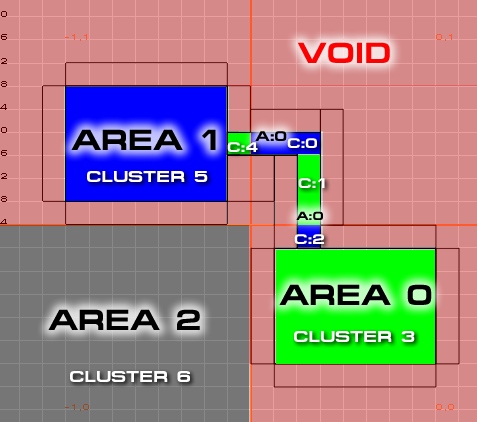
And this will be then our new level structure, notice that the area and cluster numbers have changed!
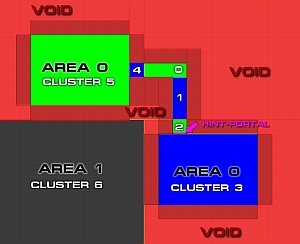
The HINT-portal is not the only portal type, we are now going to take a look at the AREA-portal and what exactly the difference between HINT- and AREA-portals is.
To create a AREA-portal we have to repeat the procedure used at the HINT-portal, but instead of the HINT-Texture we use the AREA-Texture this time.
The AREA-texture can also be found in the menu at: Texture>Common
How AREA-Portals work:
- When a AREA-Portal is closed nothing behind it will be rendered, no graphics, no sound!
- AREA-Portals needs to be signalled to OPEN and CLOSE, unlike the HINT-Portal it will not open when the player his FOV faces it.
- AREA-Portals do create a new AREA inside the AREA they are used.
- AREA-Portals are best used inside of doors.
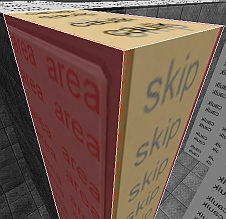
The AREA-Portal does NOT work if:
- The AREA-Portal is larger than the door
- The AREA-Portal does not touch the the surrounding „structural-Brushes“
Continue on the next page with the final Chapter: ON GRID
Our level is not placed optimal on the GRID LINES nor it is placed optimal inside the View-Blocks.
I will now correct this, to quickly select the entire level I will create a new brush covering the entire level, then I will go to the Level-Editor menu on: Selection>Select with brushes>Select inside
This selects all objects of this small level. Now I will click on one of the brushes inside the XY-TOP 2D-View with the left Mouse button, hold the button down and move my level on grid.
- The giant Area formerly known as Area 2, which has been inside the VOID is now gone
- In the Area O the AREA-Portal inside the door is now CLUSTER 1
- The HINT-Portal inside Area 0 is now CLUSTER 3
- The CLUSTERS formerly known as C:2 and C:4 are now gone too,they have been created by the the View-Blocks (Orange-lines). The new CLUSTER 1 and CLUSTER 3 created by the HINT- and AREA-Portal have taken their place.
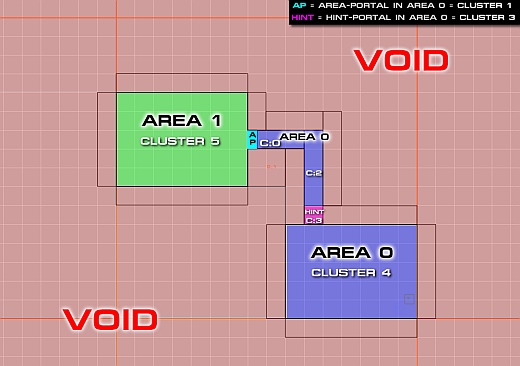
In this example moving the level proper into the GRID, reduced the calculations needed to be done by the compiler. It speeded up the BSP-Compile process, reduced the level by one area and its cluster.
Following the advices given in this tutorial allows you to:
- Reduce the network-traffic, caused by your level
- reduce graphical intense locations on your map which can be the source of lag
- build even bigger levels
Congratulations! The tutorial ends here :)
On the next page: Document Status, Additional Litarature, FAQ, Sources and Credits
This Document is under Creative Common License BY-NC

If you have suggestions, additional questions, found logic frauds or if you miss related content-items, please feel free to contact me.
Version 1.2 updated 2009.11.27
How to modifie a BSP
File Types used in Star Trek: Elite Force II
Q: Why does this tutorial refer to the players his view as camera all the time ?
A:The player sees the level recorded form a camera, this camera has a offset from the floor (in STEF2 it is 85 units). If the player switches to 3rd person-view(cg_3rdperson 1), the camera can be in a different cluster as the player model.
Q: In what angle is the player his Field of View?
A: The default Field of View angle is set to 80° (userfov or fov)
Q: Why are the blocks called brushes?
A: I can't say for sure, but I belive becouse they are calculated from thair centroid to thair edges.
- All tests have been made with Rituals Star Trek: Elite Force II Game Development Kit. This tutorial is almost completely based on the research results of the id Tech 3 engine with Rituals Entertainments ÜberTools.
- BSP (File-Format)
- Computer Graphics at Stanford University
- id Tech 3 Engine
- Quake III Arena
- Unreal Engine
- Ray Tracing
- Field of View
- Velocity with Vectors
I say thank you very much :) !
For the software:
- Ritual Entertainment
- Id Software
- OpenOffice.org
For sharing their knowledge:
- Avenger
- GSIO01
- Kekoa Proudfoot
For helping me to improve the quality of this tutorial significantly:
- Tricorder
- Deaod
For feedback to this or former versions of this tutorial:
- Pollywoggee
- Joseph Haboic
- Cryrid
- leilei
- Varsity
- N0dachi
- TheHappyFriar














i havent read through it.. but its nice to see people writing tuts for the community :) thank you
nice! Very nice!
This applies from Quake 1 (which didn't have hints or anything similar) all the way to ETQW (which does things differently, but the basics are almost the same).
Great detail & depth. :)
HL1&2 + ep1&2 and most of the quake games feature bsp compiled maps.
Thanks :)
If anyone has details I'd be happy to put them in.
I hope this guide will help me with creating a mod and thx:)
can u send me video tutorials about call of duty 1
I don't have call of duty, but I guess it is pretty similar to Quake3 mapping, you could be looking there for tutorials. This here is a rather technical tutorial explaining the mechanics behind the mapping.